AI Social Robot SCAD · UXDG 415 Children’s Mental Health Physical Product

WonderBudi

An AI robot that calms children during emotional distress, helps teachers recognize a child in need, and connects families and counselors to the support that matters most.

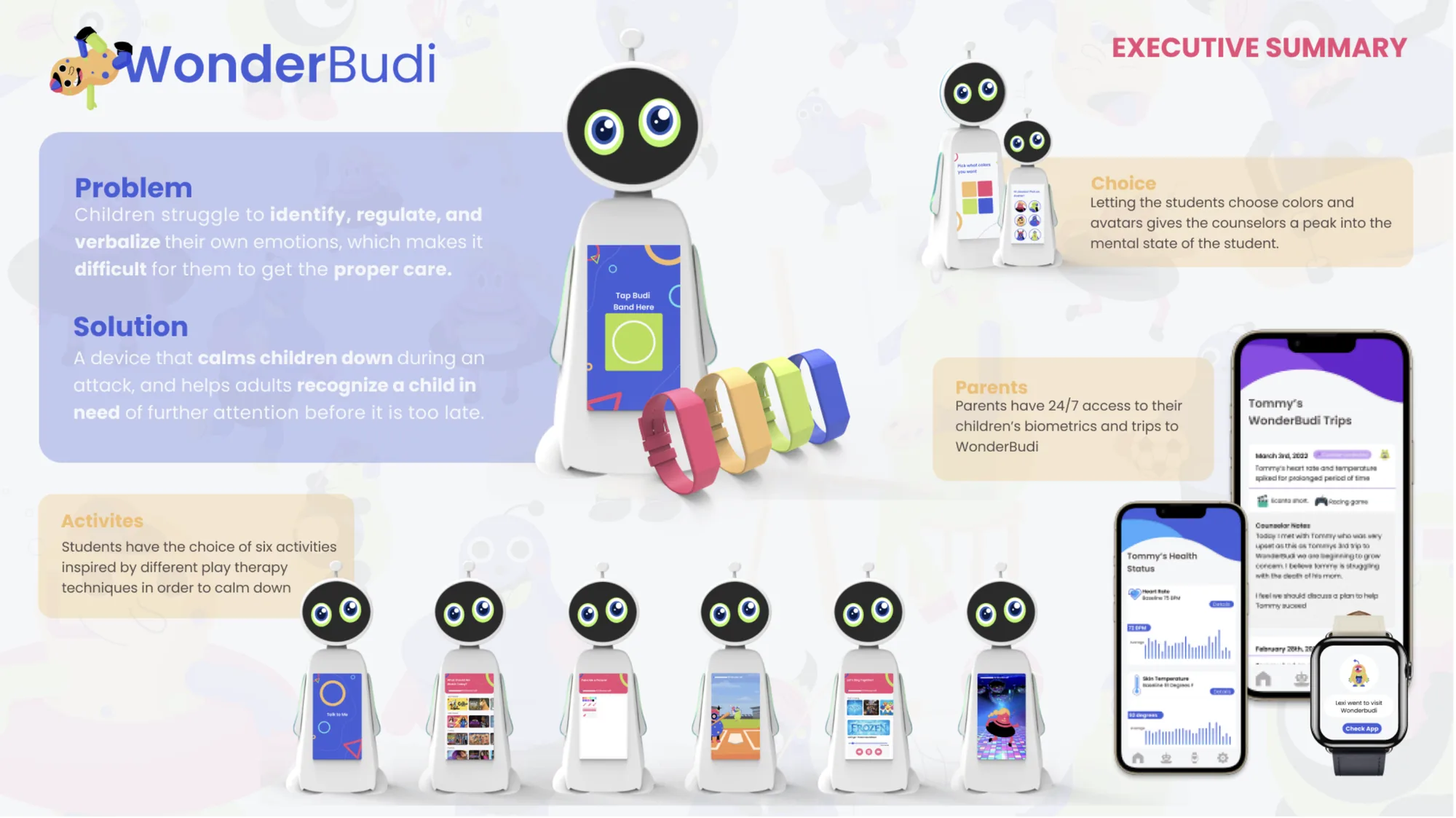
WonderBudi executive summary: the robot, the Parent App, and the Budiband wristband ecosystem shown with key features for children, parents, and counselors

A robot that gives kids a way out

WonderBudi is an AI robot designed for elementary school classrooms. It gives children a safe, engaging space to calm down during emotional distress, while silently alerting teachers and parents when a child needs further professional support.

The system pairs a biometric wristband called the Budiband with a child-facing robot and a parent-facing mobile app. When a child’s vitals signal distress, the ecosystem activates: teachers are notified, the child is walked to WonderBudi, and a structured 20-minute session of play therapy activities begins. At the end of every session, a single emoticon check-in determines whether the child returns to class or meets with a school counselor.

10 Week Project
16 Users Interviewed
22 Insights Made
3 Test Rounds

My Role

UX Researcher · Visual Designer · Prototype Lead · User Testing Lead

Technologies

Biometric Sensing (O2, heart rate, skin temperature) · NLP Voice Interaction · OLED Touchscreen Interface · Mobile Parent Dashboard · Card Sorting and Tree Testing

WonderBudi ecosystem overview: the robot, the Parent App on a smartphone, and the Budiband biometric wristband shown side by side

Three components of the WonderBudi ecosystem working together: the robot, the Parent App, and the Budiband wristband

Children who cannot speak up

Mental health challenges in children are widespread and frequently go unaddressed. Young children lack the maturity and vocabulary to identify what they are feeling, which makes it nearly impossible for them to ask for the help they need.

Schools are structurally underprepared to close this gap. There are not enough counselors to monitor every student, and most children will not surface distress on their own. By the time a problem becomes visible, it has often gone unaddressed for far too long.

How Might We

Help children calm down in times of distress and direct them to mental healthcare services when they do not have the ability to express their need for it on their own?
Secondary Research: nearly a third of U.S. youth age 12 to 17 have experienced childhood trauma that will affect their physical and mental health as adults; young children react differently than older children due to maturity, verbalization skills, and home life
Only 31% of public schools in the US provide mental health care for students

Secondary research: childhood trauma is common, but school mental health resources reach fewer than a third of students nationally

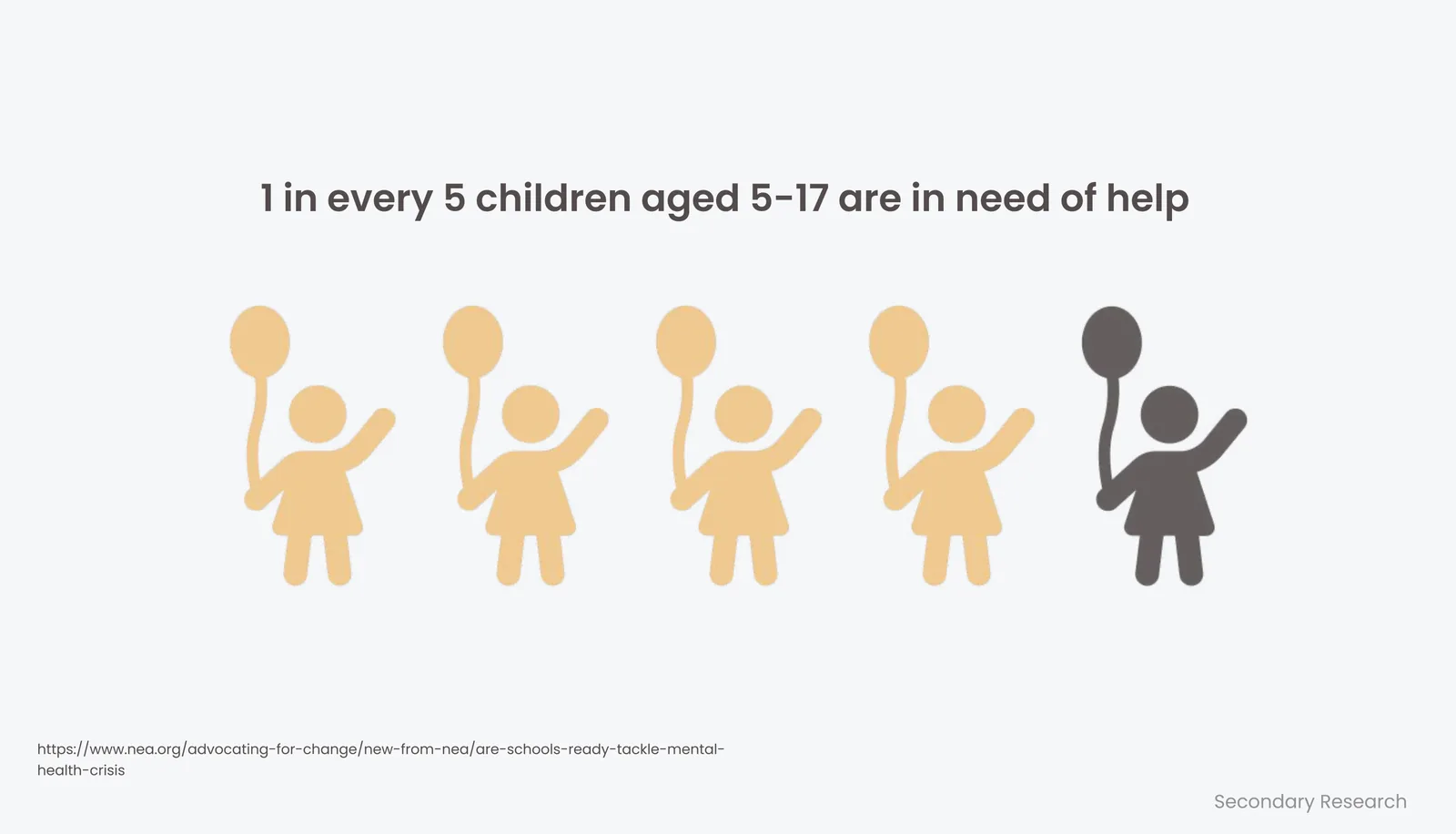
1 in every 5 children aged 5 to 17 are in need of help

1 in every 5 children aged 5 to 17 currently needs mental health support

Children may not recognize their own anxiety and often lack the maturity to explain their real or imagined stressful issues. So how do they get help?
There are too many students and not enough counselors within the school system. Teachers and faculty need to be able to identify students to send to counselors in order for them to get the proper attention.

A counselor’s perspective: the bottleneck is identification, not treatment capacity

Current Problems: children do not seek help because they do not know what they are going through or how to speak up; affordable therapies are needed; therapists use art and play therapy; kids do not know how to talk about their feelings

Four recurring problems identified across initial interviews and secondary research

Problem statement: children struggle to identify, regulate, and verbalize their own emotions, which makes it difficult for them to get the proper care

Listening before designing

A broad research effort spanning secondary literature, two surveys, and 16 structured interviews across four participant groups produced 22 core insights that shaped every design decision that followed.
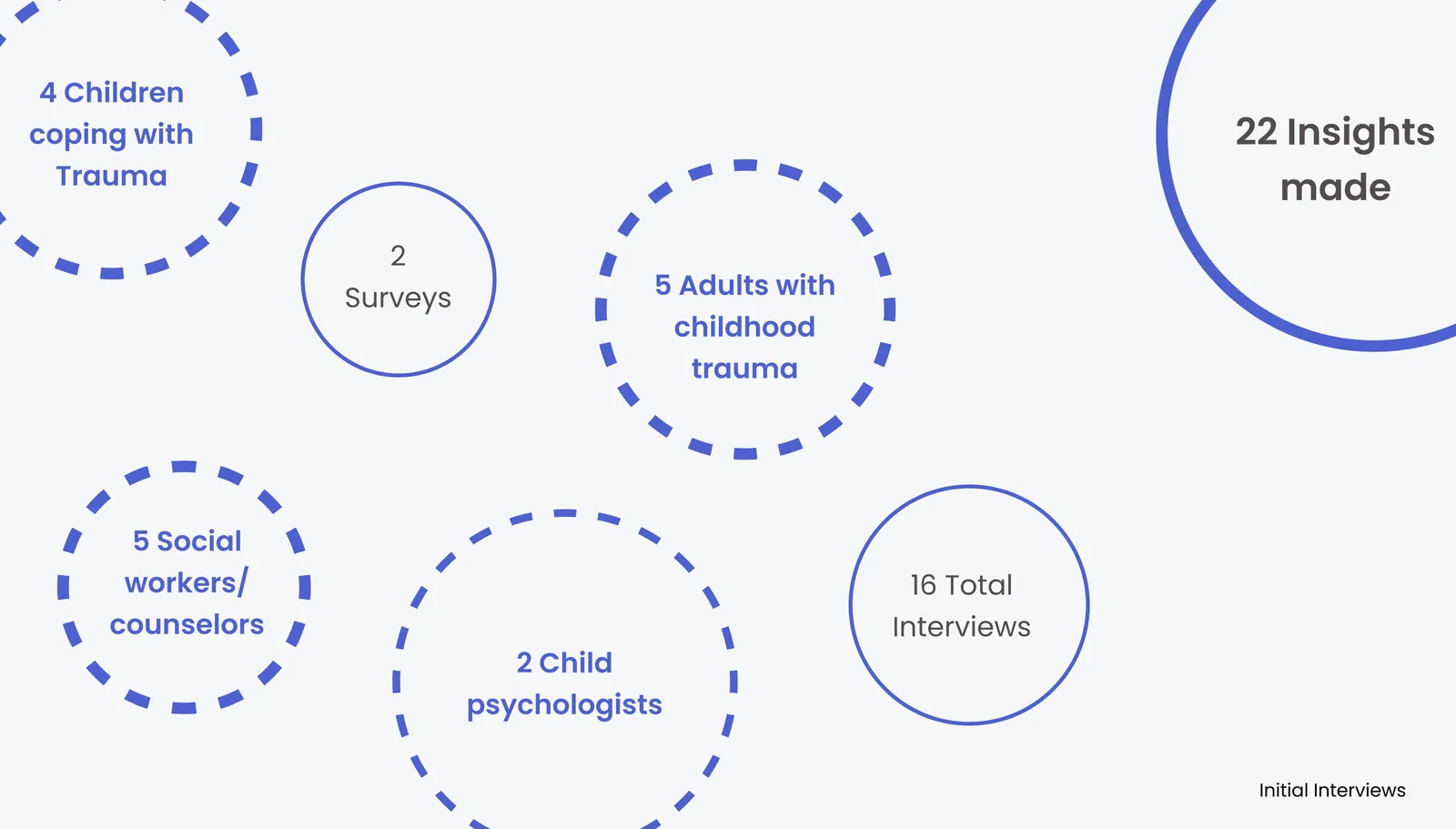
Primary research participants: 4 children coping with trauma, 5 adults with childhood trauma, 5 social workers and counselors, 2 child psychologists, 2 surveys, 16 total interviews, 22 insights made

16 interviews across four participant groups yielded 22 actionable insights

Survey Findings

Findings from Survey: children are not sure how to express what they are going through; children are easily distracted or get bored while in therapy; children are often too embarrassed to ask for help or open up to loved ones

Three core themes from the child-focused survey: expression, boredom, and embarrassment

Insights from survey (school counselors): young children have a hard time identifying when they need help
Insights from survey (social workers): there are many warning signs of a child in need, from how they sleep to what they wear; young children need forms of therapy like play therapy

School counselors flag identification as the core challenge; social workers flag the need for play-based therapeutic approaches

Voices from the Field

School Counselor quotes: often for kids talking doesn't always help, but getting out the problems through other methods like games and stories can help them express their trauma easier; a child often cannot identify their own mental health problems and as a public school counselor it is hard to monitor every child
Child Psychologist quotes: physical signs of distress include racing heart rate, high temperature, O2 levels, fighting, pacing, restlessness, deep breaths, and anger; the hardest part about child trauma is identifying a child in need

School counselors and child psychologists both point to identification as the hardest part of delivering support to children

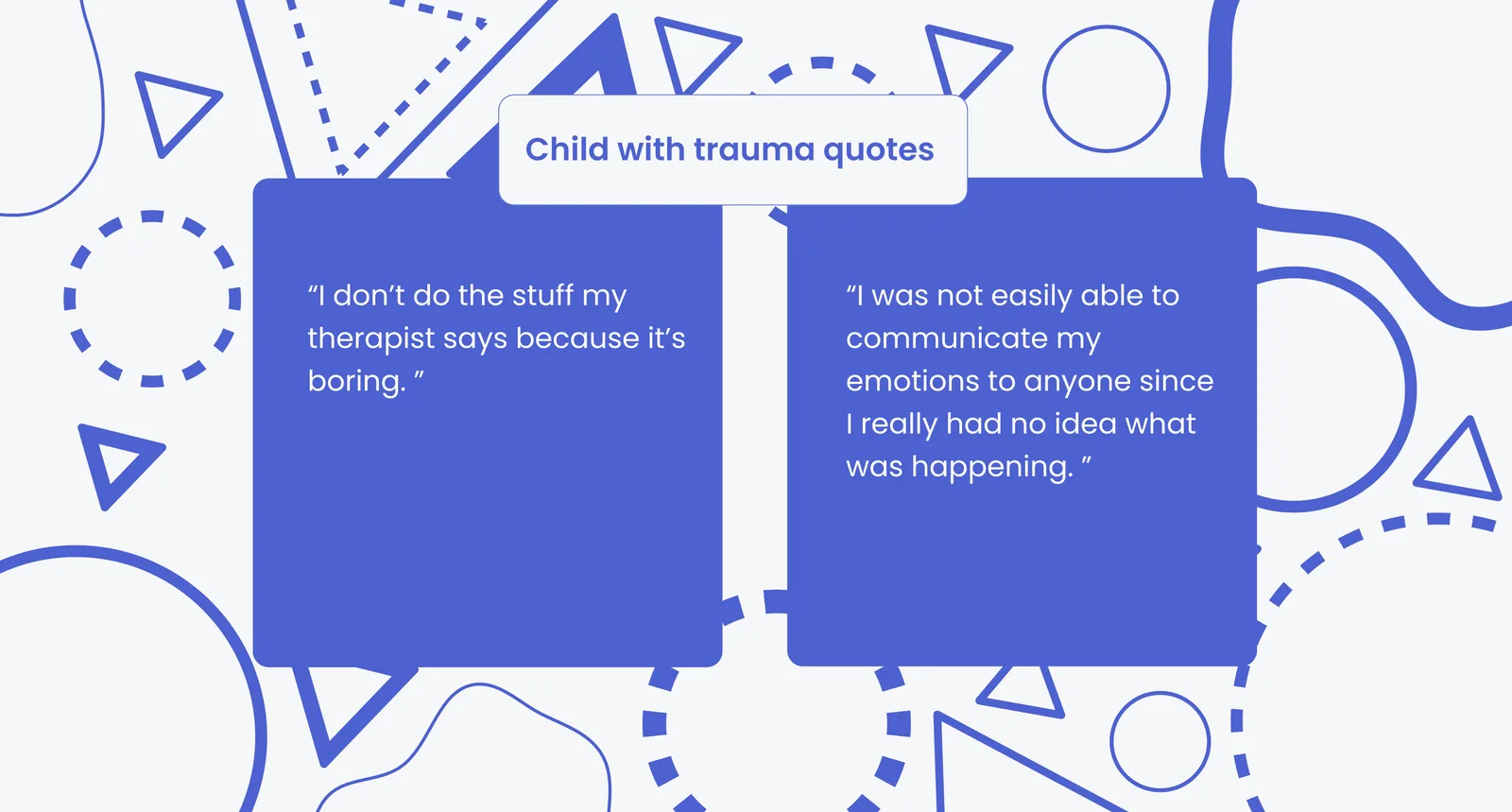
Child with trauma quotes: I don't do the stuff my therapist says because it's boring; I was not easily able to communicate my emotions to anyone since I really had no idea what was happening

Children with trauma describe boredom with traditional therapy and an inability to articulate what they feel
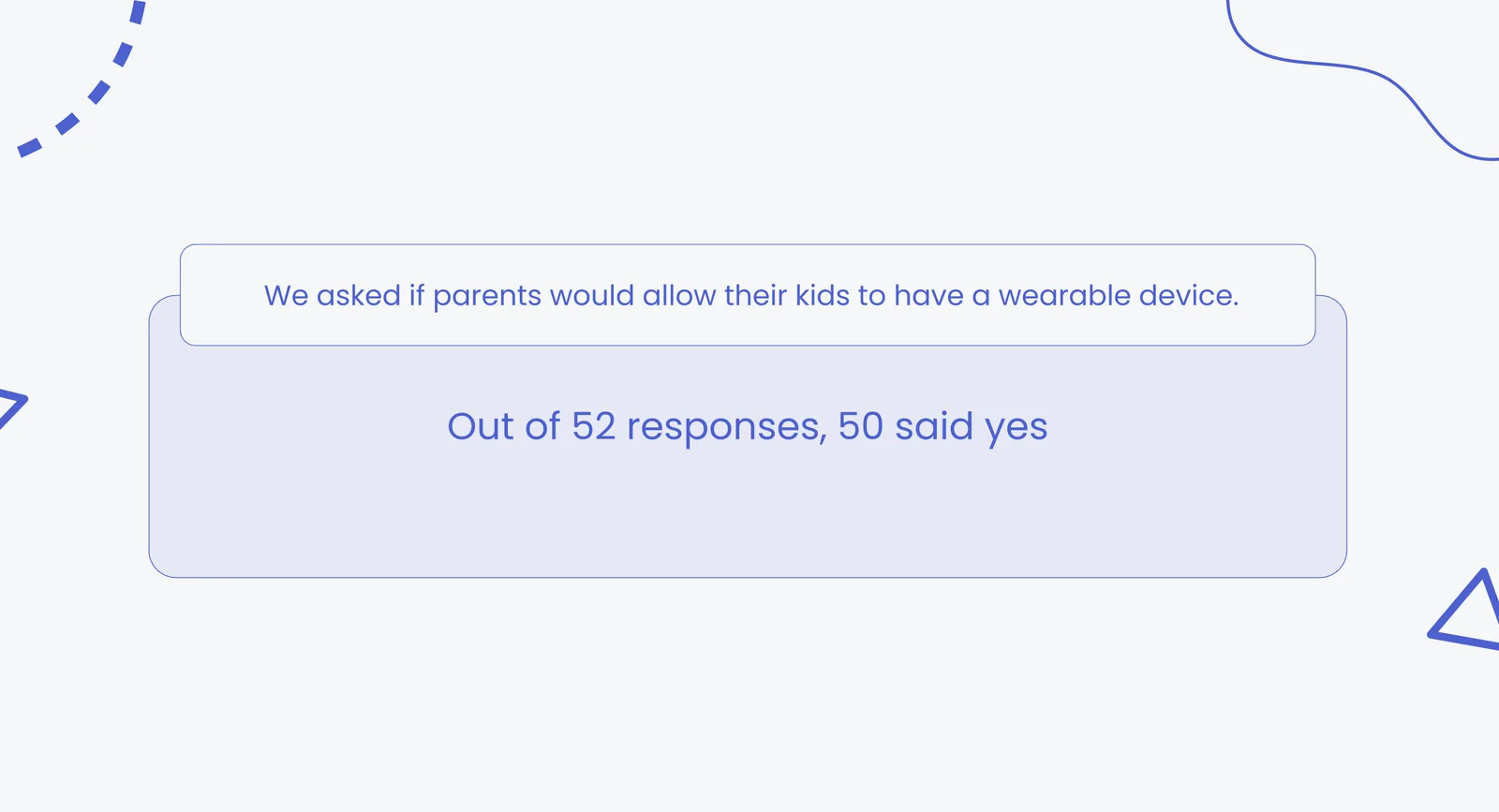
We asked if parents would allow their kids to have a wearable device. Out of 52 responses, 50 said yes.

50 out of 52 parents said they would allow their child to wear a biometric device at school

Overall insights from survey: children do not know how to express their feelings or verbalize when they need help; age and maturity level needs to be a factor when deciding what therapy is used; therapy should be fun for children; many children do not recognize their own feelings and traumas

Four overarching insights consolidated from the full survey dataset

Secondary Research

What is a Mandated Reporter: anyone who comes in contact with children regularly; they are legally required to report signs or suspicions of neglect or abuse
In regard to mental health, schools must: provide information about the tool and follow-up assistance; explain that the tool can identify social or emotional challenges; inform parents of any changes; provide a contact name; make written consent of the screening device; show the parent the screening device if requested

Legal context: mandated reporting obligations and school compliance requirements shaped the Parent App’s notification and consent design

Insights from secondary research: public schools cannot give long-term care to any of their students; children struggle to express their feelings for a variety of reasons; many children are in need of help for mental health issues but are unable to receive it

Secondary research confirmed the gap between need and access in public school mental health support

Affinity Mapping

Primary Research and Affinitization section divider
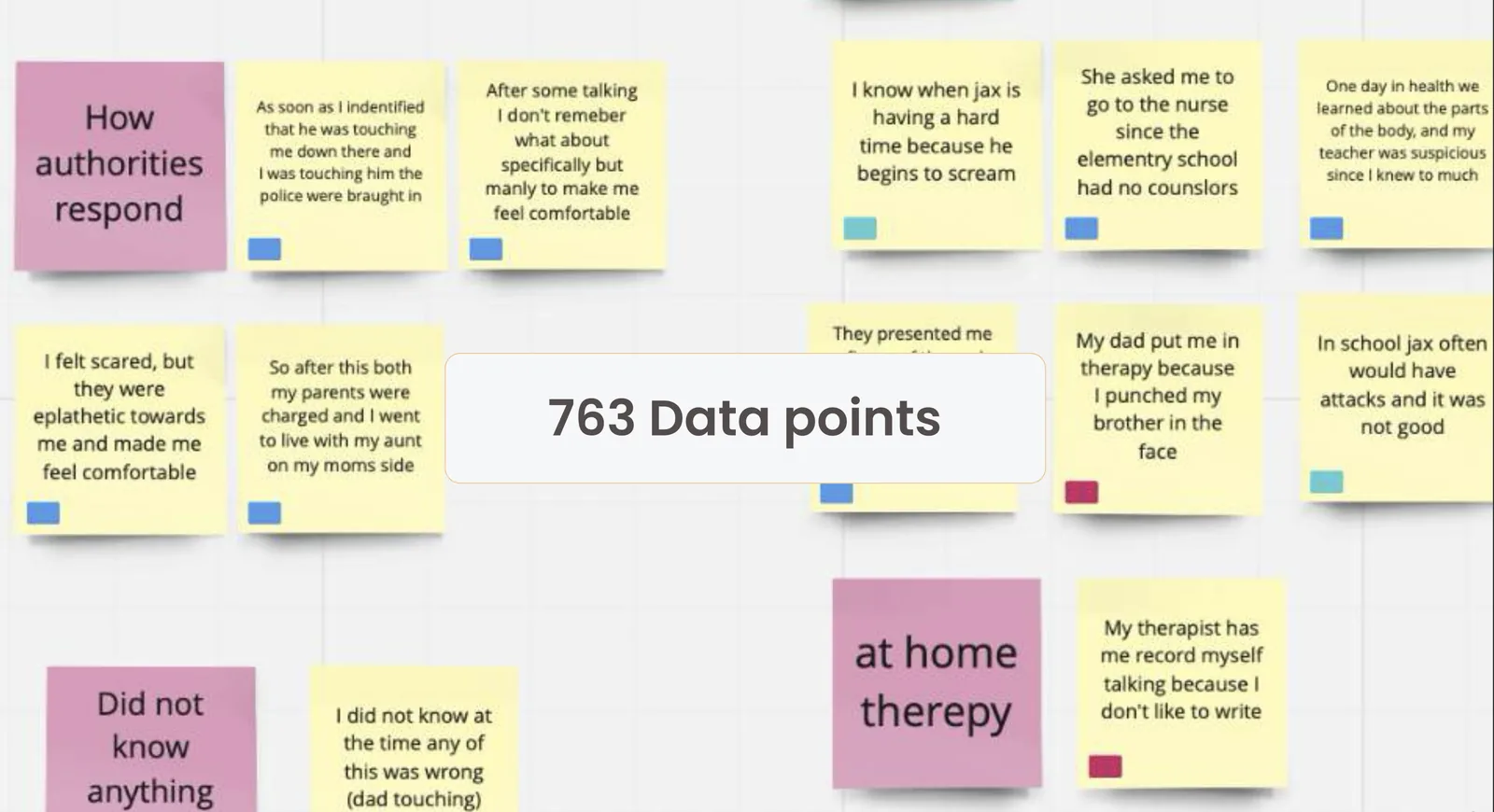
Affinity map with 763 data points organized into clusters covering how authorities respond, home therapy experiences, and children's trauma at school

763 data points from all 16 interviews organized by theme and participant type

Affinity Mapping Process: 6 steps from raw data, grouped by interviewee type, grouped by similarity, grouped insights, analysis, and HMW statements
How Might We statements: help children get the proper attention for their needs whether it be a diagnosis, long-term care, or accommodations; detect a child struggling with distress silently without them verbalizing it; inform adults when their child exhibits signs of mental health problems in school

A 6-step affinitization process from raw data to three How Might We statements

Overarching How Might We: help children calm down in times of distress, and direct them to mental healthcare services, when they don't have the ability to express their need for it on their own

The overarching How Might We that unified all subsequent design work

The Pivot

Mid-research, the team discovered that schools did not need more therapy programs. The real problem was identifying which students needed those programs in the first place. This drove a strategic pivot that redefined the entire product direction.

Pivot from: adolescent coping and accepting of traumas. Pivot to: children struggling to regulate their emotions while at school
The last thing schools needed were more therapy programs. The real problem lied with identifying students who needed therapy and diagnosis. The team pivoted from helping students cope to helping students get the attention they need.

The pivot: from helping children cope directly, to helping the adults around them identify who needs support before it is too late

From insight to system

With the pivot established, the team built personas, mapped emotional user journeys, ran a Crazy 8 ideation sprint, and selected the WonderBudi ecosystem as the direction most capable of serving children, parents, and counselors simultaneously.

Personas and User Journeys

Personas and User Journeys section
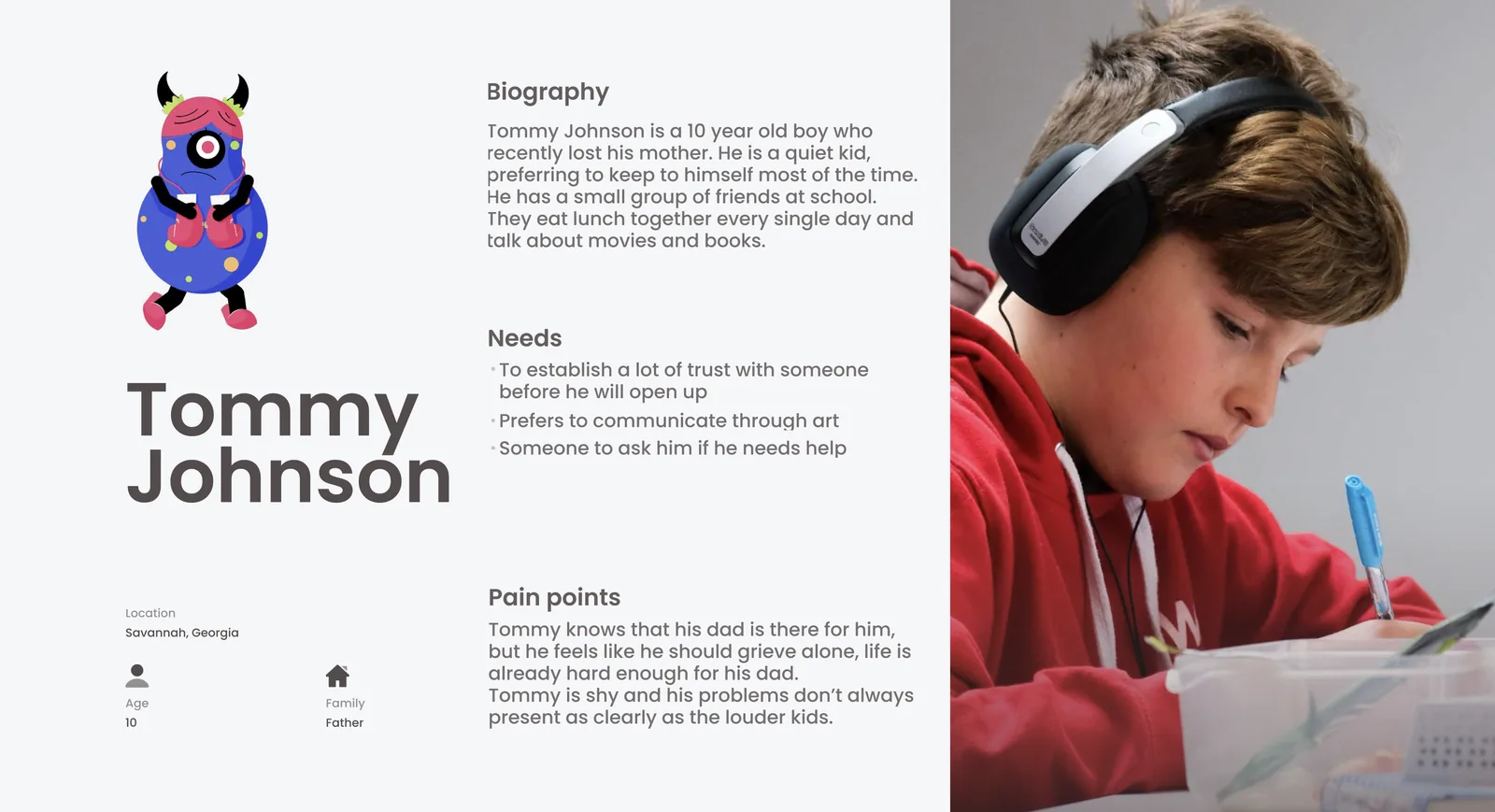
Tommy Johnson, 10 years old, Savannah Georgia, recently lost his mother, a quiet kid who keeps to himself, prefers to communicate through art, shy and not always as visible as the louder kids in class
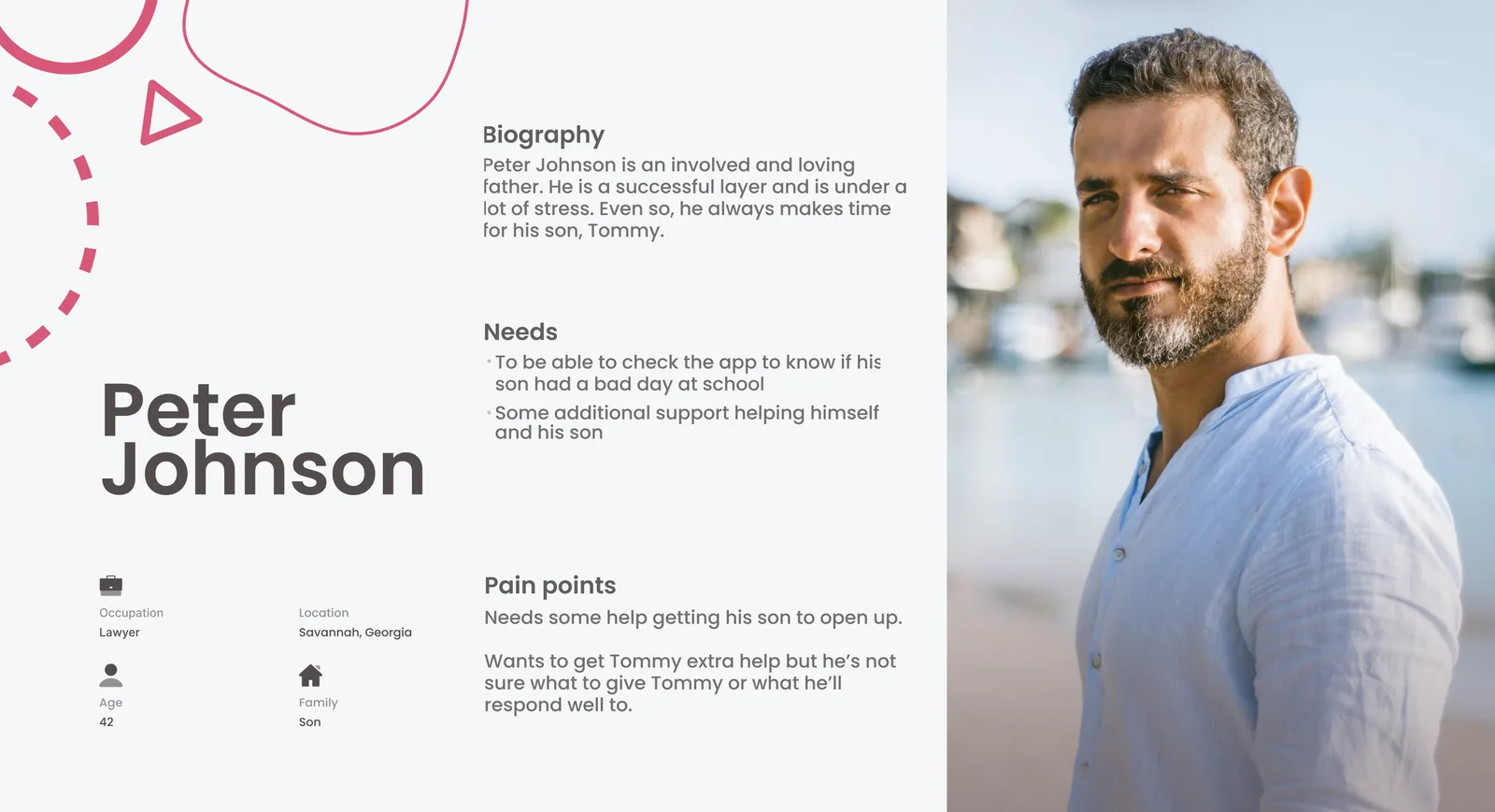
Peter Johnson, 42, lawyer, Savannah Georgia, an involved and loving father under a lot of stress, wants to send Tommy to therapy but is not sure Tommy will open up, very active on the parenting app

Tommy (child) and Peter (parent): two perspectives on the same unmet need, separated by a communication gap WonderBudi is built to bridge
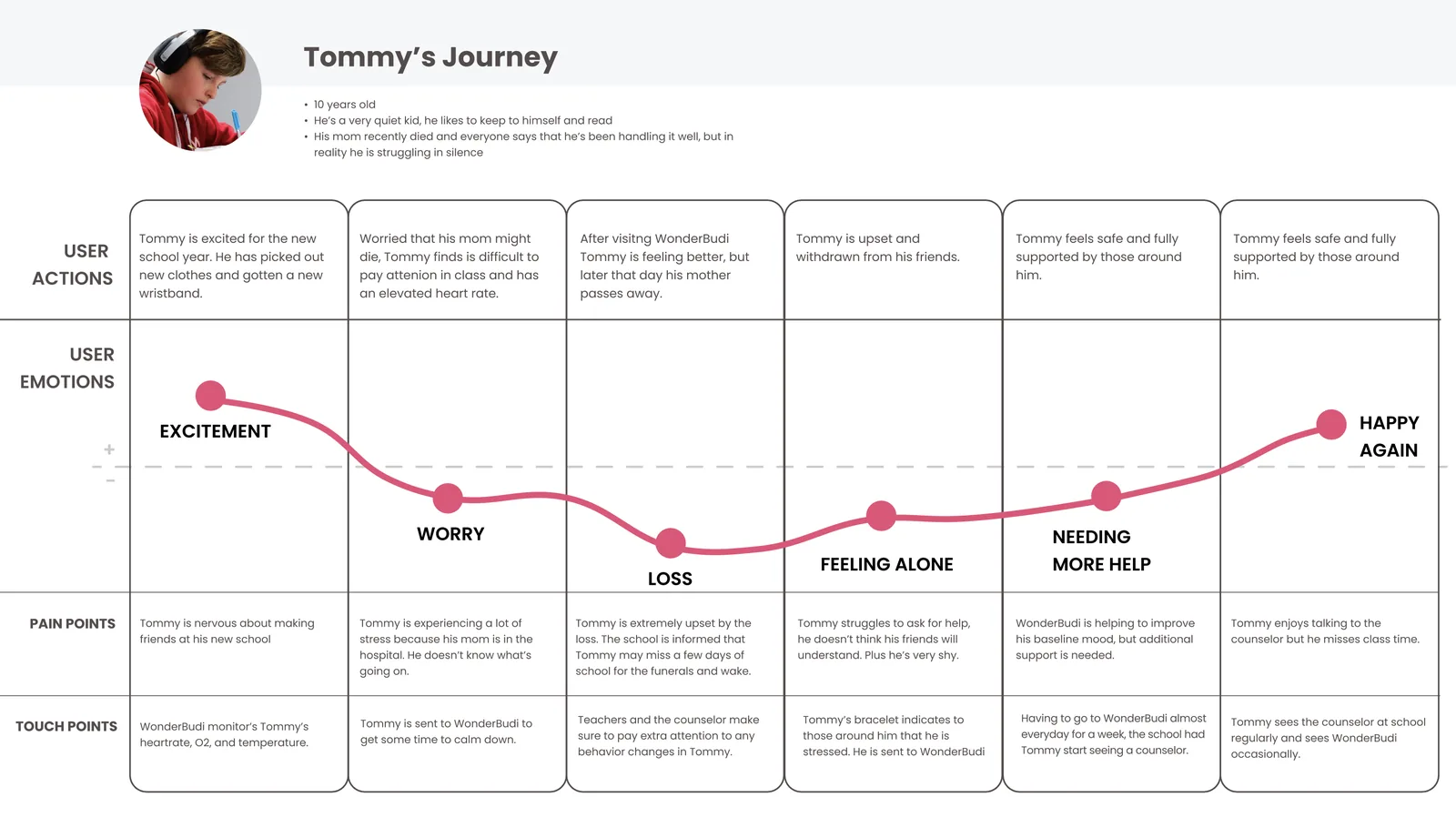
Tommy's Journey map: excitement at the new school year, worry as he pays less attention in class, loss after his mother passes away, feeling alone and withdrawn from friends, needing more help, fully supported through WonderBudi, happy again at the end of the year

Tommy’s emotional arc across a school year, with WonderBudi as the turning point where the downward spiral is interrupted

Peter's Journey map: reassured at parent orientation, worried as his son becomes more withdrawn, grieving after his wife dies, uncertainty about how to help Tommy, getting help through the WonderBudi app, happy again knowing Tommy is fully supported by the school

Peter’s journey: a parent who cannot reach his child, until WonderBudi gives him a window into his son’s school day

Ideation

Crazy 8 ideation exercise: eight rapid concept sketches exploring different product directions for the WonderBudi system including app interfaces, physical devices, robot concepts, and service models

Crazy 8 ideation: eight rapid concept sketches generated in eight minutes to open up the solution space

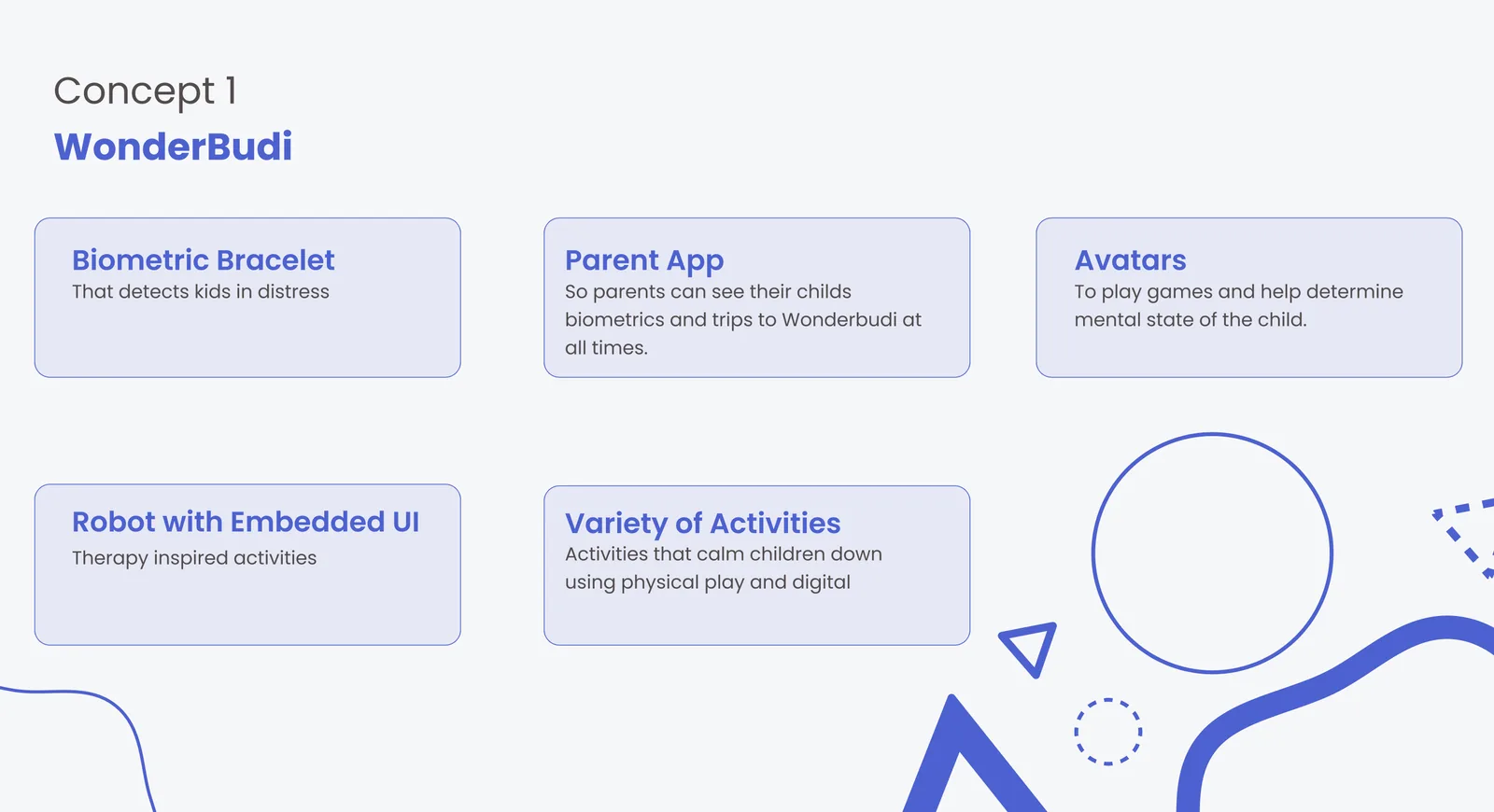
Concept 1 WonderBudi: biometric bracelet that detects kids in distress, parent app, avatars to play games and help determine mental state of the child, robot with embedded UI for therapy-inspired activities, variety of activities using physical play and digital
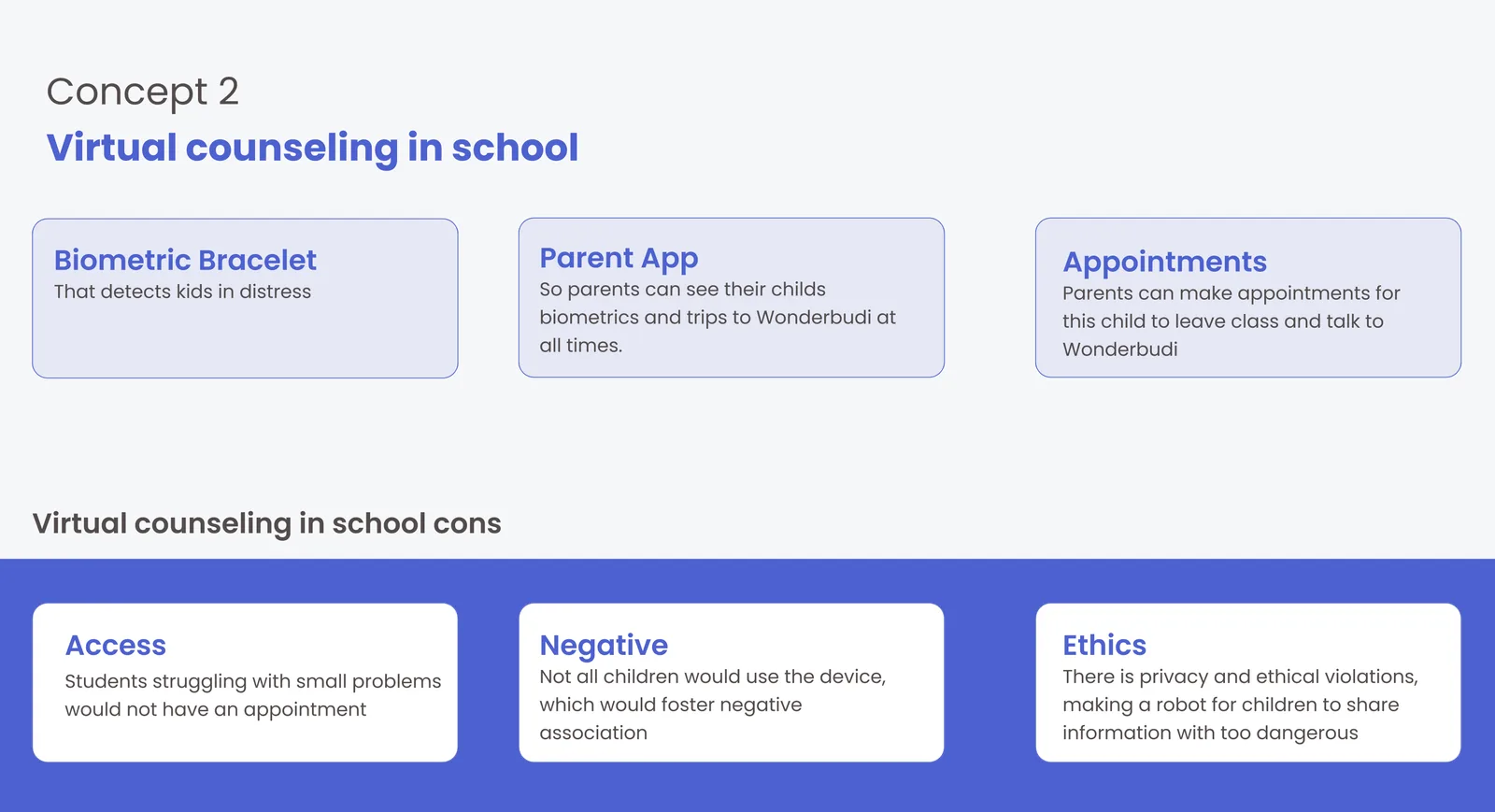
Concept 2 Virtual counseling in school: biometric bracelet, parent app, appointments. Cons: access issues for students with small problems who would not get an appointment, not all children would use the device which fosters a negative association, privacy and ethical violations

Concept 1 (WonderBudi) was selected over Concept 2 (virtual counseling) because Concept 2 raised access, stigma, and ethics concerns

Solution: a device that calms children down before an attack, and helps adults recognize a child in need of mental health help before it is too late
WonderBudi is not an everyday therapy tool. WonderBudi is: a device that calms children down before an attack, and helps adults recognize a child in need of mental health help before it is too late

A deliberate scope boundary: WonderBudi is an early-intervention tool, not a replacement for ongoing therapy

What We Know: the system needs to feel rewarding; monitoring should be intertwined with things children already use; use emojis at the end for reflection; therapy includes digital and movement; therapy is tailored to children's interests
What We Need to Work Through: exactly what the role of the teacher is; how to determine children's interests without them telling us; when and how a parent is contacted; what the wearable will be exactly

Design constraints clarified before entering final concept development

Expected Outcomes: give children a safe space when feeling emotional distress and determine if further assistance is required from a school counselor; a wearable device that monitors vital signs to detect emotional distress as early as possible; help parents monitor their child's mental health; provide children with individualized activities and skills to calm down when experiencing emotional distress

Four expected outcomes that served as success criteria throughout the project

Storyboard

A classroom storyboard placed WonderBudi in a realistic school scenario, showing how three children with three different emotional states are all served by the same system on the same day in Mrs. Zimmerman’s class.
Storyboard setup: Tommy, Jennifer, and Ryan all attend the same public elementary school in Mrs. Zimmerman's class on March 8th at different times. Jennifer had a fight with her friend. Tommy just lost his mother and is triggered by Greg's mom bringing cupcakes. Ryan is misbehaving by throwing pencils to get classmates' attention.

Three children, three situations, one classroom: a realistic scenario to stress-test the WonderBudi system

Storyboard events: Jennifer began crying and her oxygen level became elevated, and Mrs. Zimmerman visibly saw the distress. Tommy's Budiband detected a very elevated heart rate and alerted Mrs. Zimmerman. Ryan had never acted out this way before so instead of reprimanding him, Mrs. Zimmerman instructed him to take some time with WonderBudi to cool off.

The Budiband detects what teachers cannot always see, and surfaces it before the moment is missed

Storyboard: all three students spent 15 to 20 minutes with WonderBudi doing different things they enjoy, from watching a show, to playing games, and listening to music

All three children use the same WonderBudi robot, each choosing their own activity to decompress in their own way

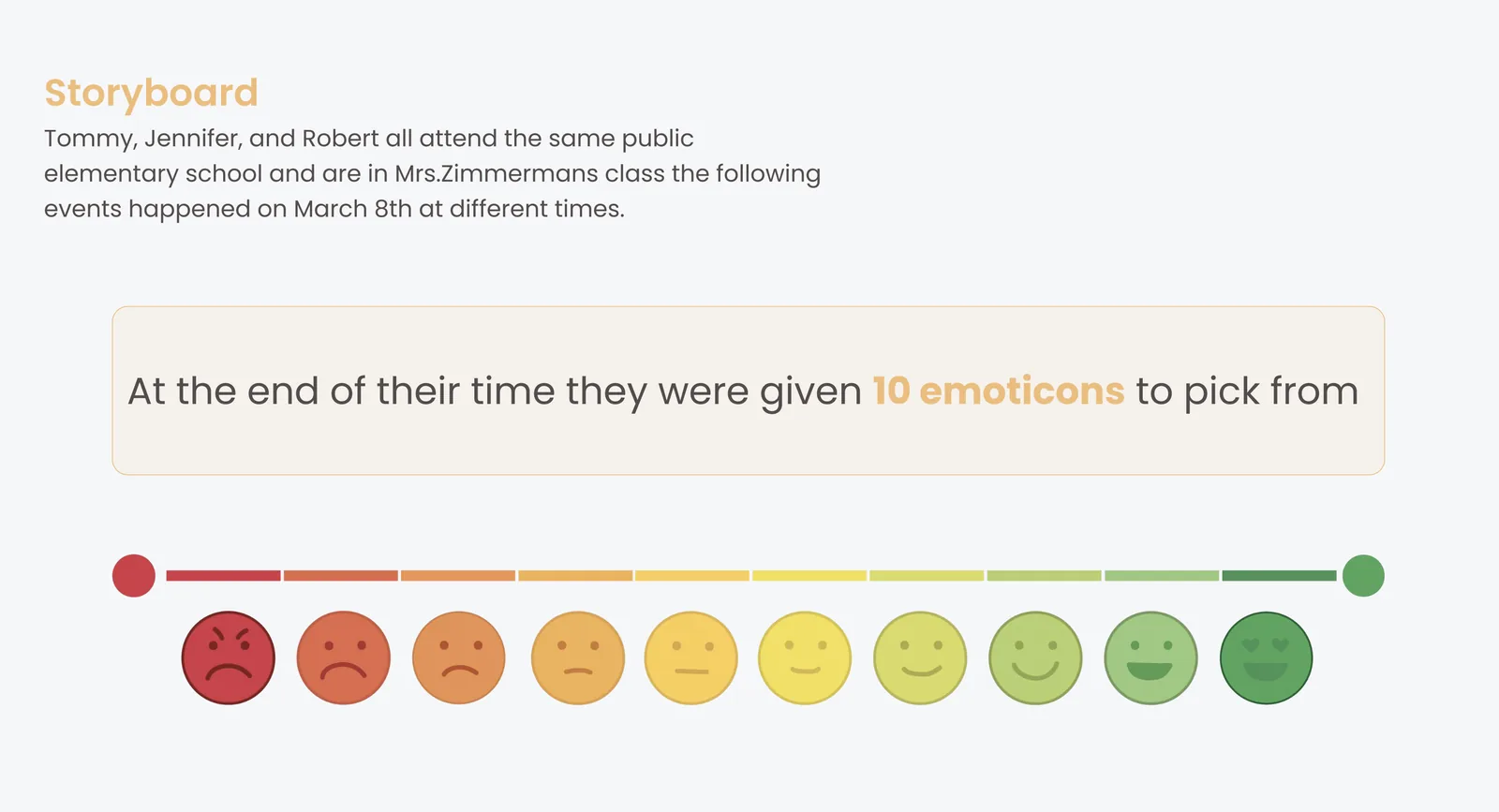
Storyboard: at the end of their time, all three students were given 10 emoticons to pick from, ranging from a very unhappy red face on the left to a very happy green face on the right
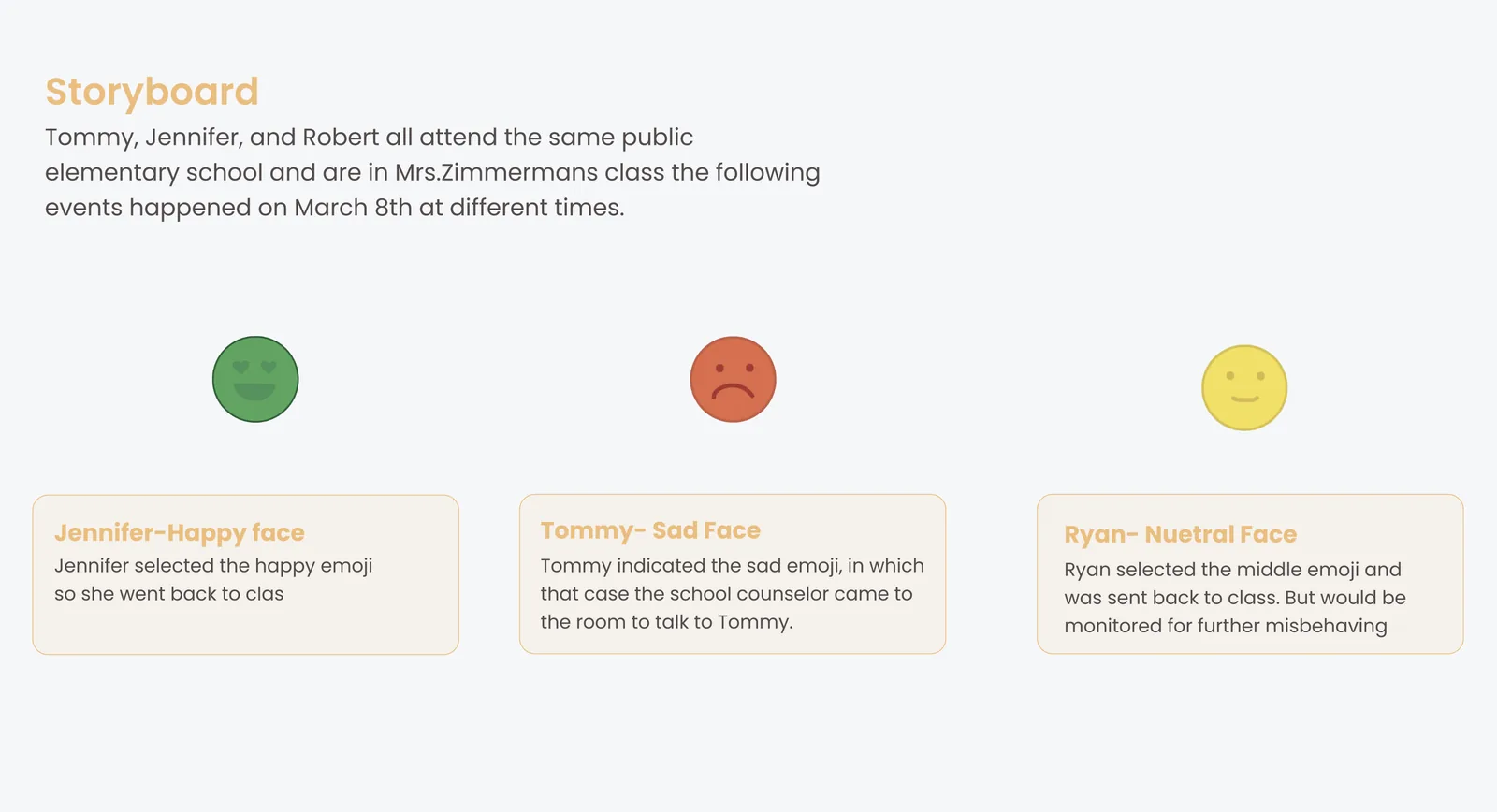
Storyboard outcomes: Jennifer selected the happy face and went back to class. Tommy indicated the sad emoji, in which case the school counselor came to the room to talk to Tommy. Ryan selected the middle emoji and was sent back to class to be monitored for further misbehaving.

A single emoticon check-in routes each child correctly: back to class, counselor visit, or continued monitoring

Building the WonderBudi world

The final design is a connected three-part ecosystem: the WonderBudi robot, the Budiband biometric wristband, and the Parent App. Each component serves a different user, but all three share a data layer that keeps counselors, teachers, and parents informed in real time.
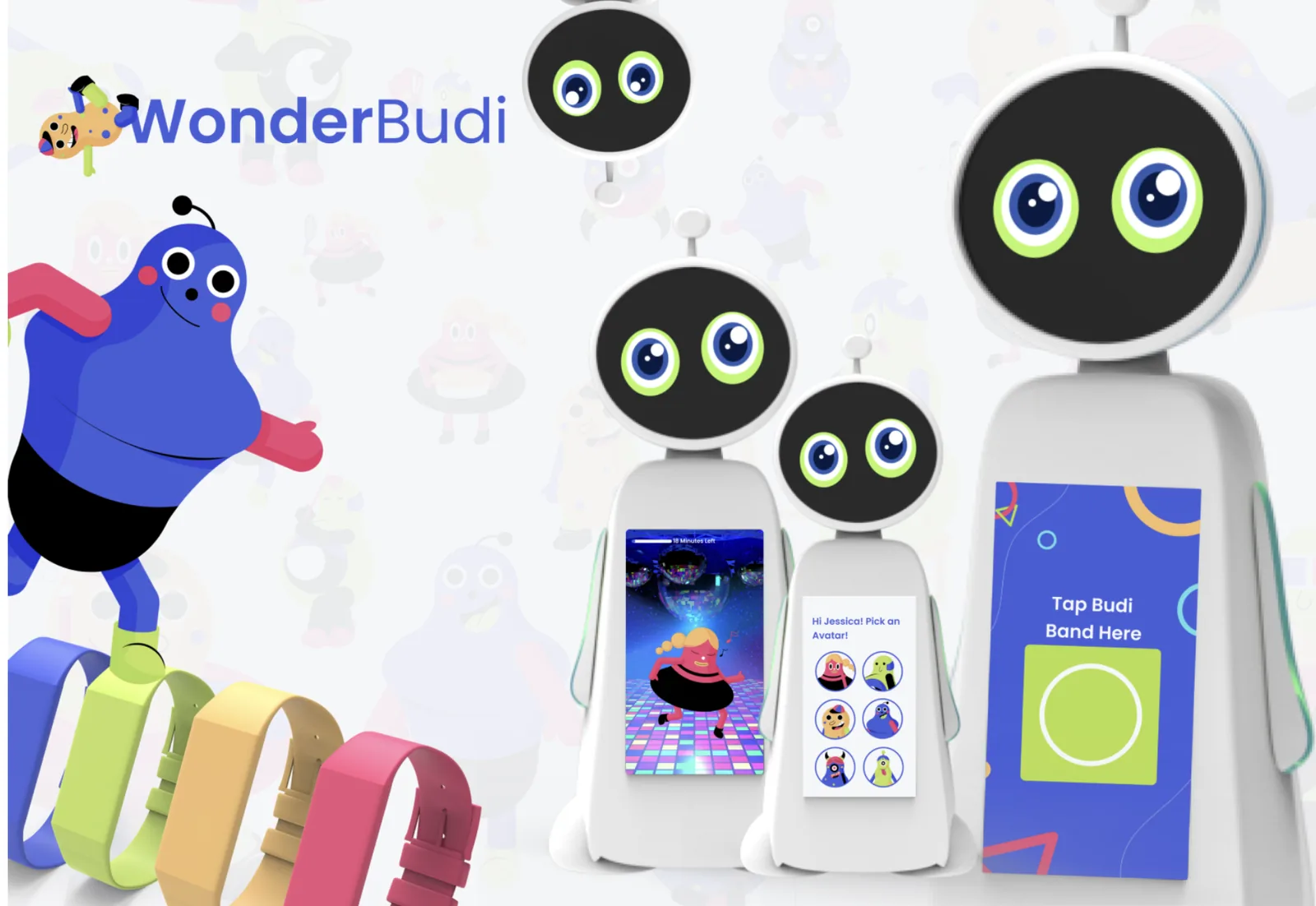
WonderBudi robot with colorful Budibands in five colors, an activity interface showing categories on the embedded screen, and the Tap Budi Band Here onboarding screen on the right panel

The WonderBudi robot, Budiband wristbands in five colors, and the tap-to-start onboarding screen

Final solution statement: a device that calms children down during an attack, and helps adults recognize a child in need of further mental health help before it is too late

The Ecosystem Flow

WonderBudi Ecosystem before WonderBudi: Step 1, parents receive a consent form with a WonderBudi description and emergency contact. Step 2, parents download the parent app. Step 3, parents can track activities, see counselor notes, and customize activity options for their child.

Before WonderBudi: a consent and onboarding process ensures parents are informed and in control before their child’s first session

What happens in school: Step 1, when Budiband detects a change in biometrics, teachers and adult supervisors get a notification. Step 2, teachers have a quick conversation to ask if the child needs a 5-minute breather or a trip to WonderBudi. Step 3, an adult walks the student to WonderBudi near the counselor's office.
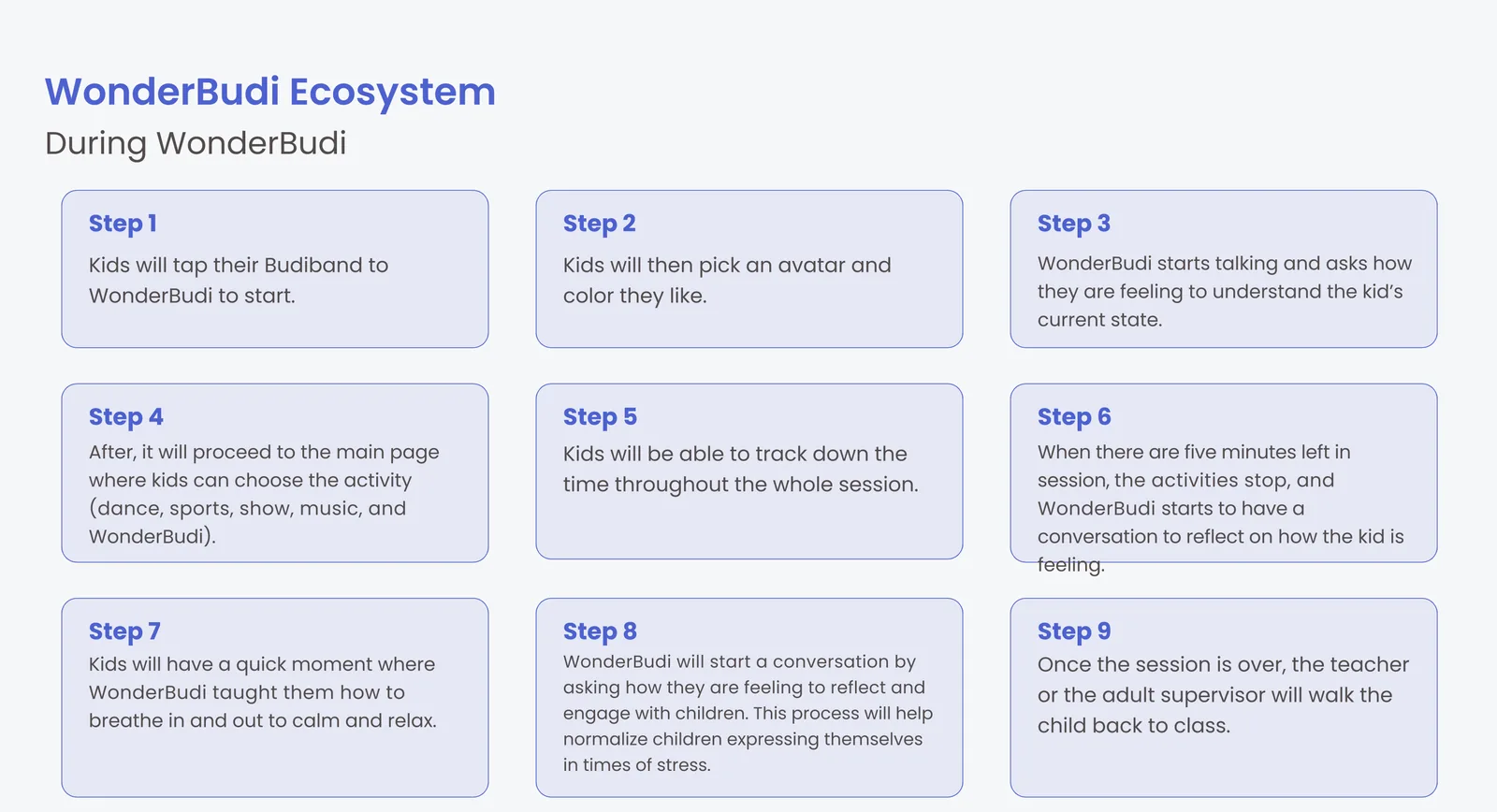
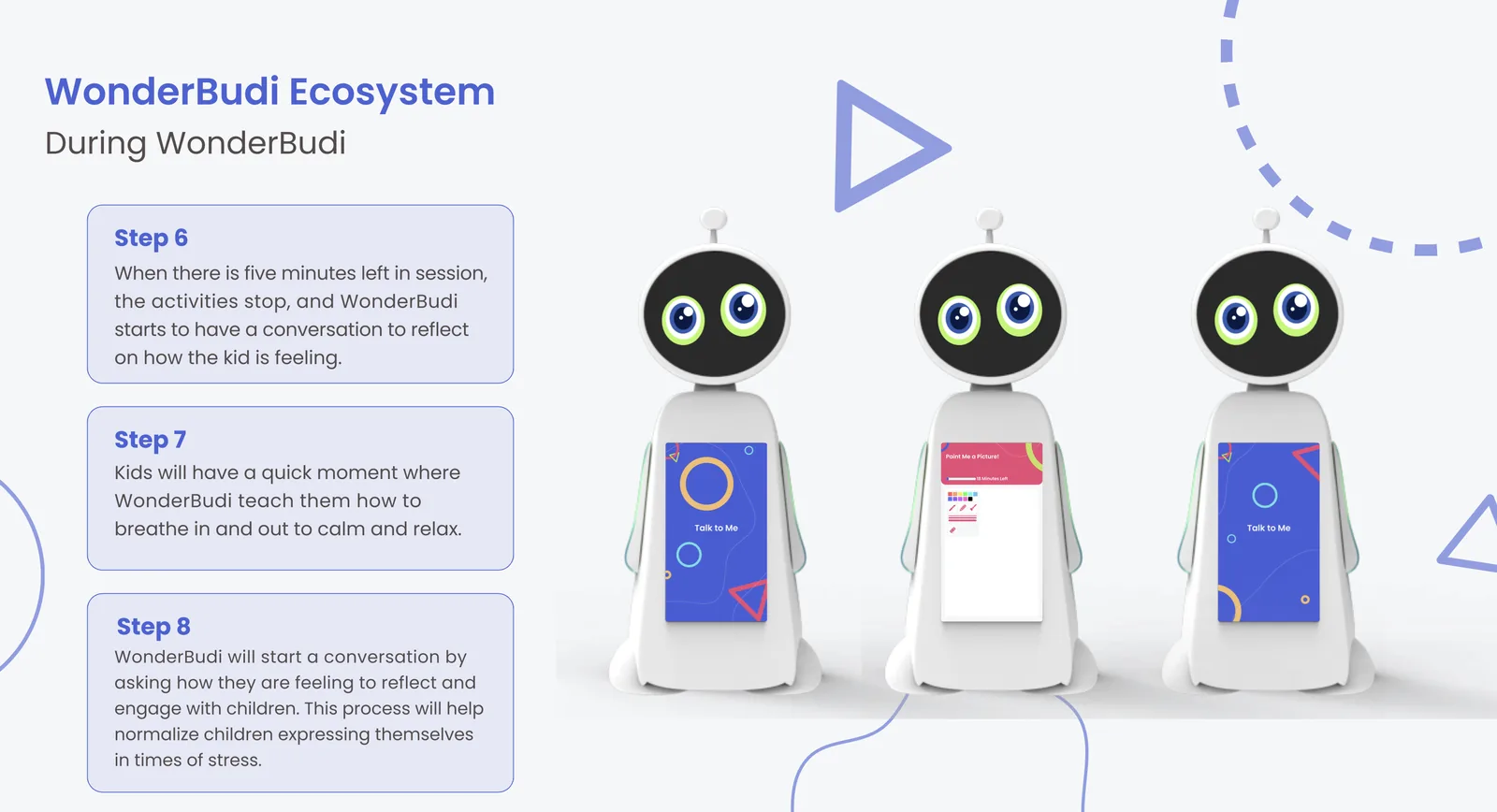
During WonderBudi, 9 steps: tap Budiband to start; pick an avatar, color, and face expression; WonderBudi asks how the child is feeling; choose an activity; track time; WonderBudi starts a reflection conversation; kids have a breathing moment; WonderBudi starts a conversation to reflect and engage; once the session is over, the teacher walks the child back to class

From biometric alert to classroom return: the full in-school flow across nine structured steps

The WonderBudi Session

Step 2: WonderBudi session avatar and color selection screen shown across three robot views. Kids pick an avatar character, a background color, and a face expression they can relate to.
Step 3: WonderBudi starts talking and asks how the child is feeling today to understand their current state. Screen shown across three robot views with a blue ambient color and gentle prompts.

Steps 2 and 3: personalization through avatar selection followed by an opening emotional check-in

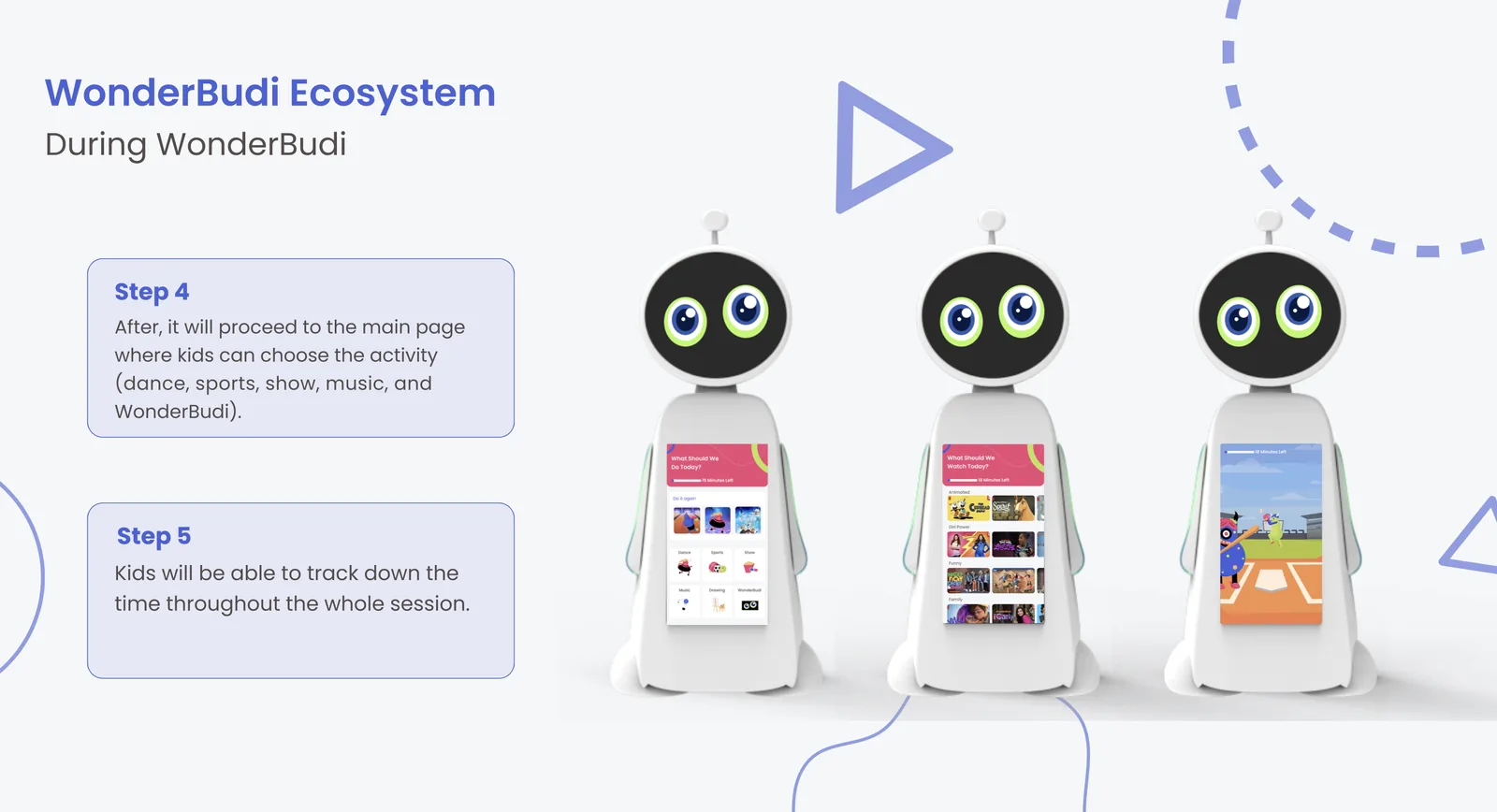
Steps 4 and 5: kids choose from dance, sports, show, music, and WonderBudi activity categories. A timer lets them track the remaining time throughout the whole session.
Steps 6, 7, and 8: WonderBudi starts a reflection conversation when 5 minutes remain. Kids have a quick breathing in and out moment to calm and relax. WonderBudi then asks how they are feeling to normalize expressing emotions in times of stress.

Steps 4 through 8: structured play transitions into a guided breathing moment and reflection before the child returns to class

WonderBudi robot showing the show and video activity interface with categories: animated, all shows, funny, family, and a full-screen video playing in the center circular display

The activity screen lets each child choose what calms them most, personalizing every session without requiring adult input

Voice Interaction Scripts

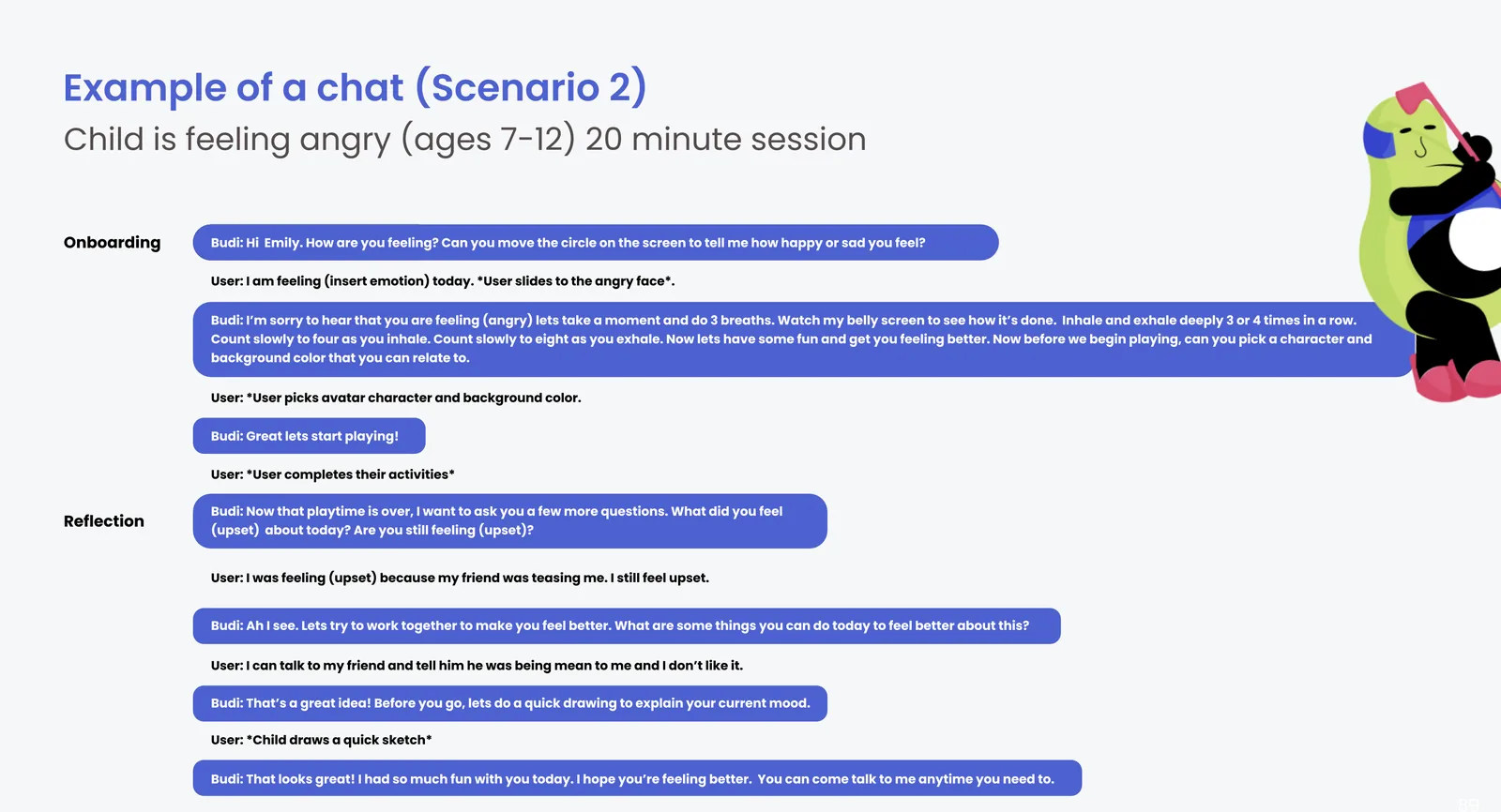
Three conversation scripts cover the most common emotional states children arrive with. Each follows the same structure: an opening check-in, a play session, a guided reflection, and a closing affirmation that the child can return anytime.
Chat Scenario 1: child is feeling sad, ages 7 to 12, 20-minute session. Budi greets the child, they slide to the sad face, pick an avatar, play activities, then reflect on sitting alone at snack time and what they might do next.

Script 1: a child feeling sad gets a reflection conversation that ends with a concrete social next step

Chat Scenario 2: child is feeling angry, ages 7 to 12, 20-minute session. Budi leads a breathing exercise first, then play activities, then reflects on a friend being mean and what the child can say to that friend today.
Chat Scenario 3: child is feeling anxious, ages 7 to 12, 20-minute session. Budi explores the anxiety about a test together, then helps the child identify a concrete step like talking to their teacher to look over what they did wrong.

Scripts for anger (left) and anxiety (right): each emotion gets a tailored opening, then converges on the same reflective structure

Hardware and Components

WonderBudi Components List: Antenna with motion capture camera, microphone, and servo motor; Face Screen 10 by 6 inch 1080p OLED display; Main Screen 10 by 19 inch 1080p OLED touchscreen; LED Light Strips; Body in thermal or injection moulded plastic; Internal Structure in aluminum frame
BudiBand: reads heart rhythm, O2 levels, and temperature. Has no screen to prevent distractions. Parents can see the data but the student cannot. Available in blue, yellow-green, gold, and pink.
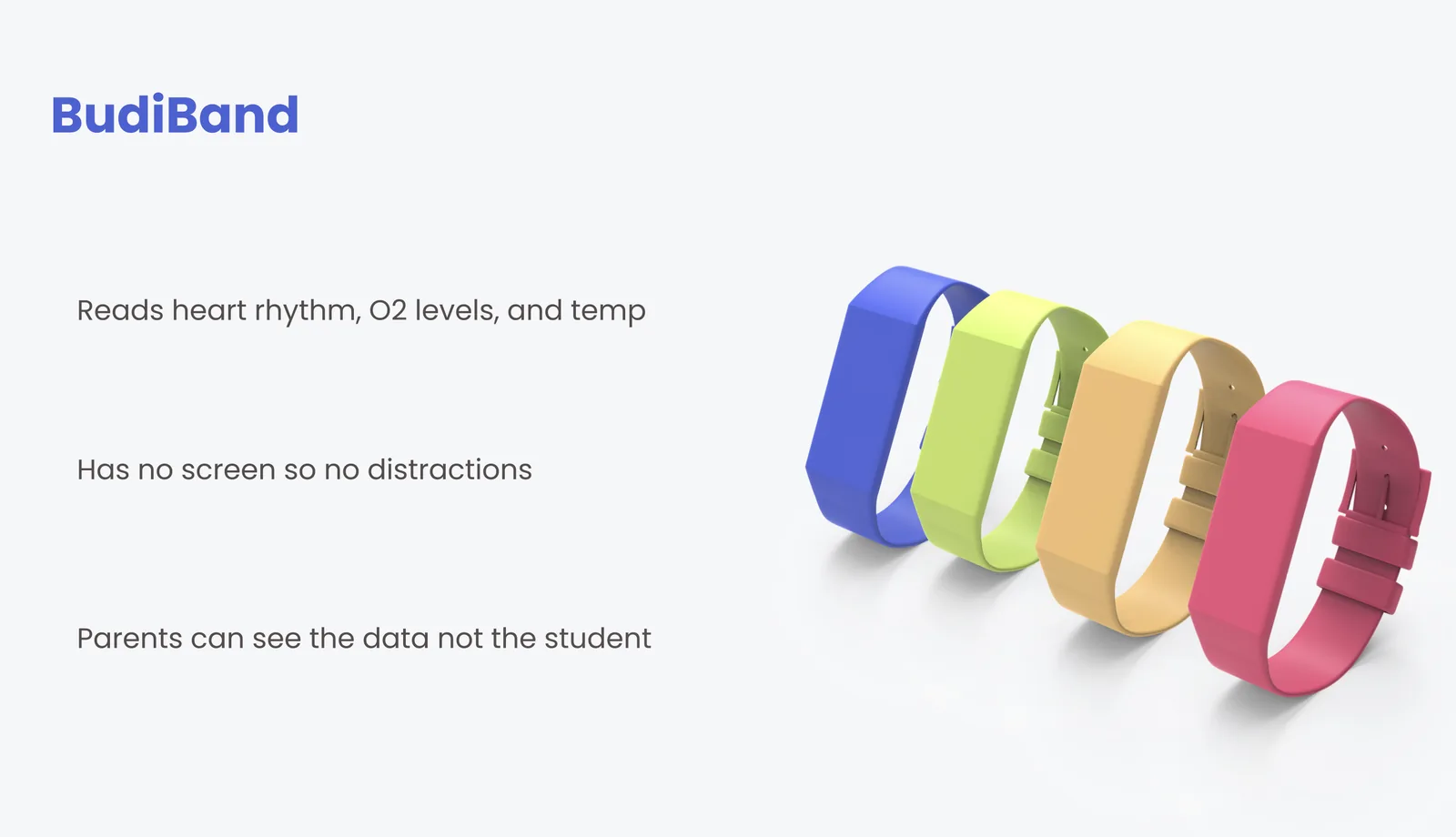
Robot components (left) and the Budiband wristband (right): no screen on the band ensures children are never distracted by their own biometric data

Budiband detail: monitors the child's O2 rate, heart rate, and skin temperature. Parents can see in real time their child's biometric data and get notified of any abnormalities. No display screen. Comfortable and waterproof. Kids have a choice of 5 colors.

Budiband in detail: comfortable, waterproof, screenless, and available in five colors for personalization

Parent App

Parents have 24/7 access to their child’s biometrics and WonderBudi session history through the companion app. The dashboard acts as a single control center: showing vitals, session transcripts, counselor notes, and activity permissions together in one view.
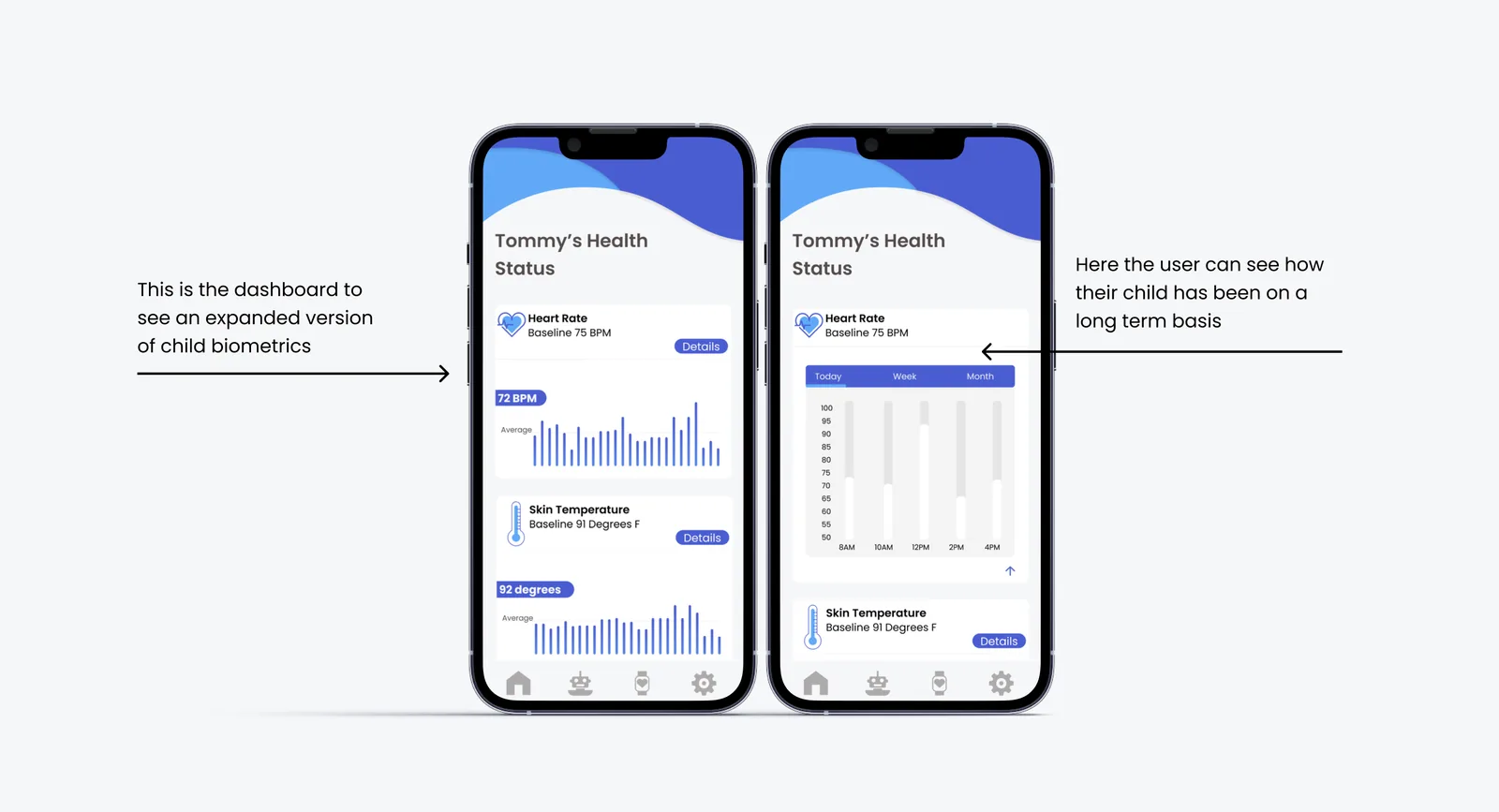
WonderBudi Parents companion app: Tommy's WonderBudi Trips session history and Tommy's Health Status biometric dashboard shown side by side on phone and smartwatch

The Parent App gives families a continuous window into their child’s wellbeing throughout the school day

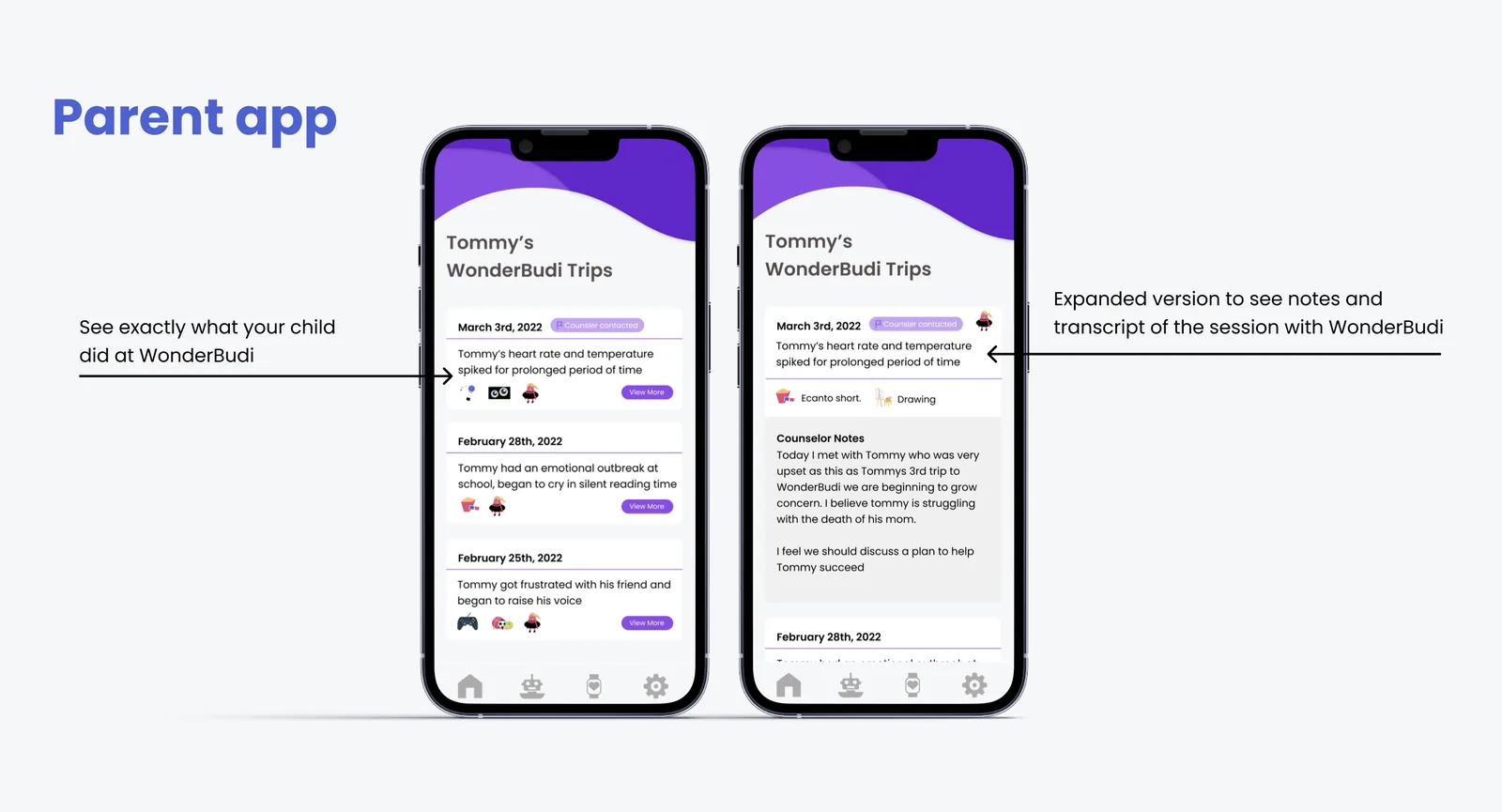
Parent app WonderBudi Trips: shows session history with dates, short descriptions, and an expanded view that includes the full session transcript and counselor notes about Tommy's grief
Parent app Health Status: Tommy's heart rate, skin temperature, and O2 levels shown in current reading and long-term chart views across daily, weekly, and monthly time ranges

Session history with counselor notes (left) and long-term biometric trends (right) give parents a complete and evolving picture of their child
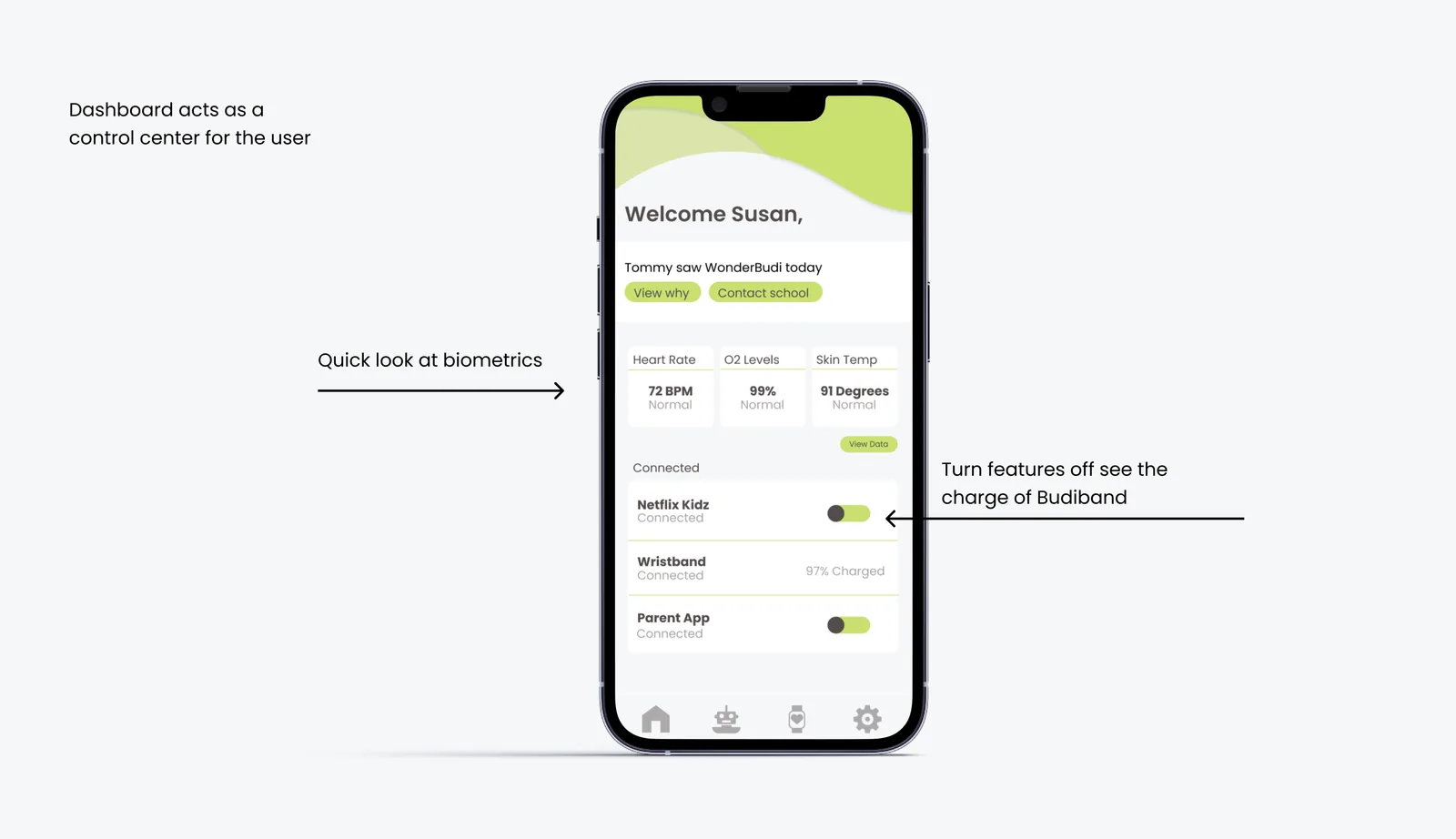
Parent app dashboard: Welcome Susan, Tommy saw WonderBudi today with quick action buttons to view why and contact school. Biometric summary showing heart rate 72 BPM, O2 levels 99%, skin temperature 91 degrees. Connected services toggles for Netflix Kids, Wristband, and Parent App.
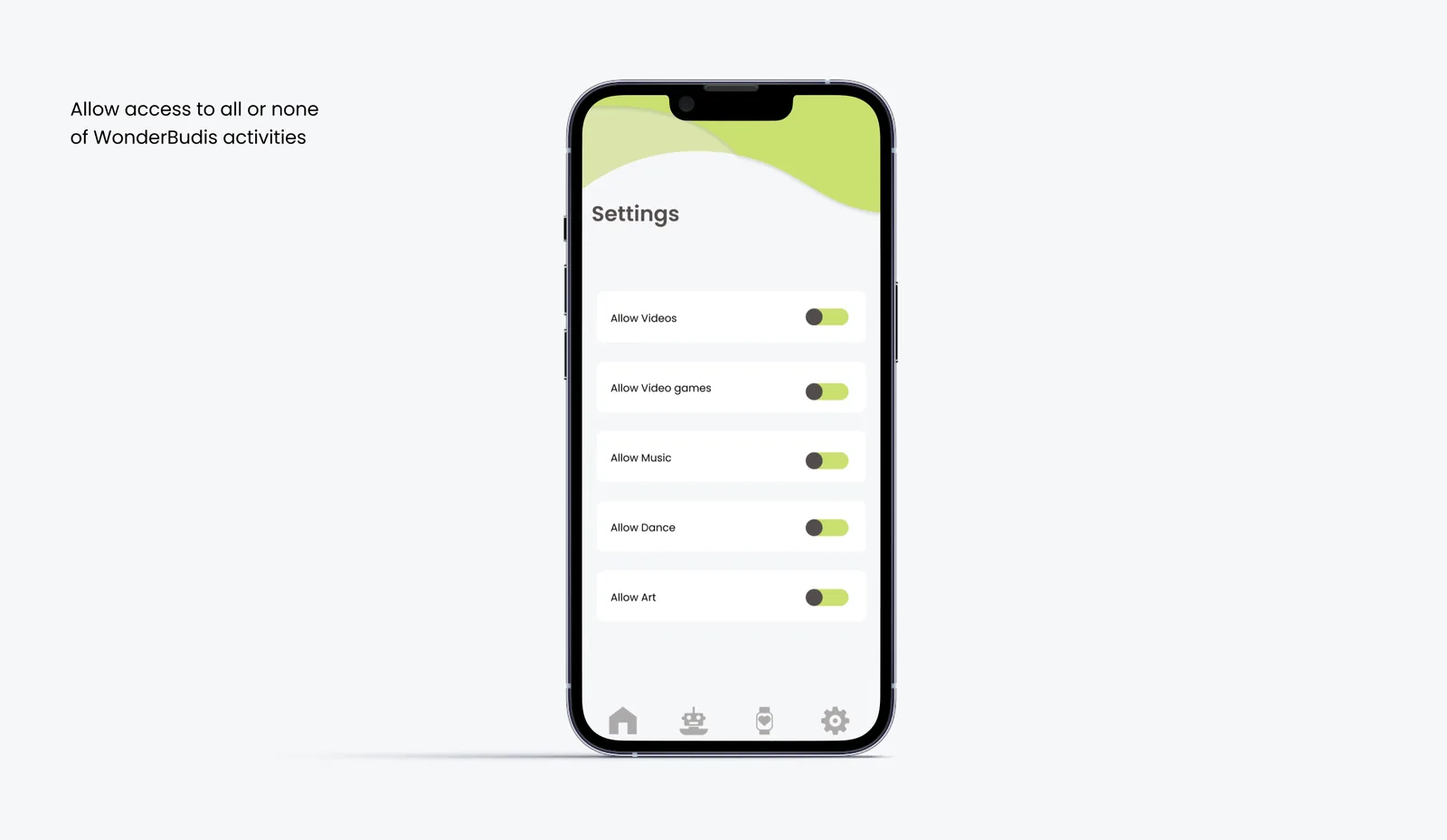
Parent app Settings: parents can allow or deny access to each WonderBudi activity type including videos, video games, music, dance, and art using toggle switches

The dashboard acts as a control center (left); settings give parents full authority over which activity types their child can access (right)

Business Model Canvas for WonderBudi: key partners are school administrators, manufacturers, and streaming services. Value proposition: detects emotional distress through biometric data and gives children a safe place to calm down while alerting parents, teachers, and counselors. Revenue streams: Tier 1 device and parent app for 800 dollars, Tier 2 tablet and parent app for 300 dollars.

Business Model Canvas: a two-tier pricing model makes WonderBudi accessible to schools at different budget levels

Why WonderBudi works the way it does

Four decisions defined the character of the product. Each one came directly from something a real user said or did during research or testing.

Why does the Budiband have no screen?

Early concepts included a display on the wristband to show the child their own biometric readings. Research with child psychologists showed that giving children real-time access to their own stress data increases anxiety rather than reducing it. Removing the screen entirely kept the band invisible to the child while still giving parents and teachers full visibility through the app. The band works best when the child forgets it is there.

Why is the session exactly 20 minutes?

Play therapy literature and direct interviews with school counselors pointed to 15 to 20 minutes as the window where a child can decompress without missing enough class to fall behind. Shorter sessions did not give enough time for the reflection conversation. Longer sessions created re-entry anxiety. The 20-minute structure was not arbitrary. It was the clinical consensus from the professionals interviewed during research.

Why is the emoticon check-in 10 options instead of 3?

A 3-option check-in (happy, neutral, sad) was the first design. Counselor feedback in testing showed that a 3-point scale collapsed too many emotional states into the same category and routed children incorrectly. A 10-point scale with a color gradient from red to green gives the system enough resolution to distinguish a child who is slightly upset from one who needs immediate counselor intervention. The routing accuracy depends on the granularity of the input.

Why is WonderBudi placed near the counselor’s office?

Placing WonderBudi in the classroom itself was the original plan. Teacher interviews revealed that a robot in the classroom would create distraction and stigma, with other students watching when a classmate was sent to use it. Moving it near the counselor’s office normalized the visit as a routine school activity rather than a visible disciplinary or emotional event, protecting the child’s dignity during a vulnerable moment.

Testing with real educators and children

Three rounds of user testing validated the Parent App’s information architecture through card sorting and tree testing with children and parents, and gathered direct feedback from six real educators and counselors across international and domestic schools.
Six educators and counselors participated in testing: Poige Emerich ES Teaching and Learning Coordinator at International School of Kuala Lumpur; Sarah Elsergnaggwy 1st to 5th grade PE teacher; Katie Keller 7th grade English teacher; Amanda Power 3rd grade teacher; Jessica Welshorn 4th grade teacher; Chris Wright Counselor at International School of Kuala Lumpur

Six educators and school counselors across international and domestic schools participated in structured testing sessions

User Testing Methods: Card Sorting open and closed, Tree Test, Interviews, Observation
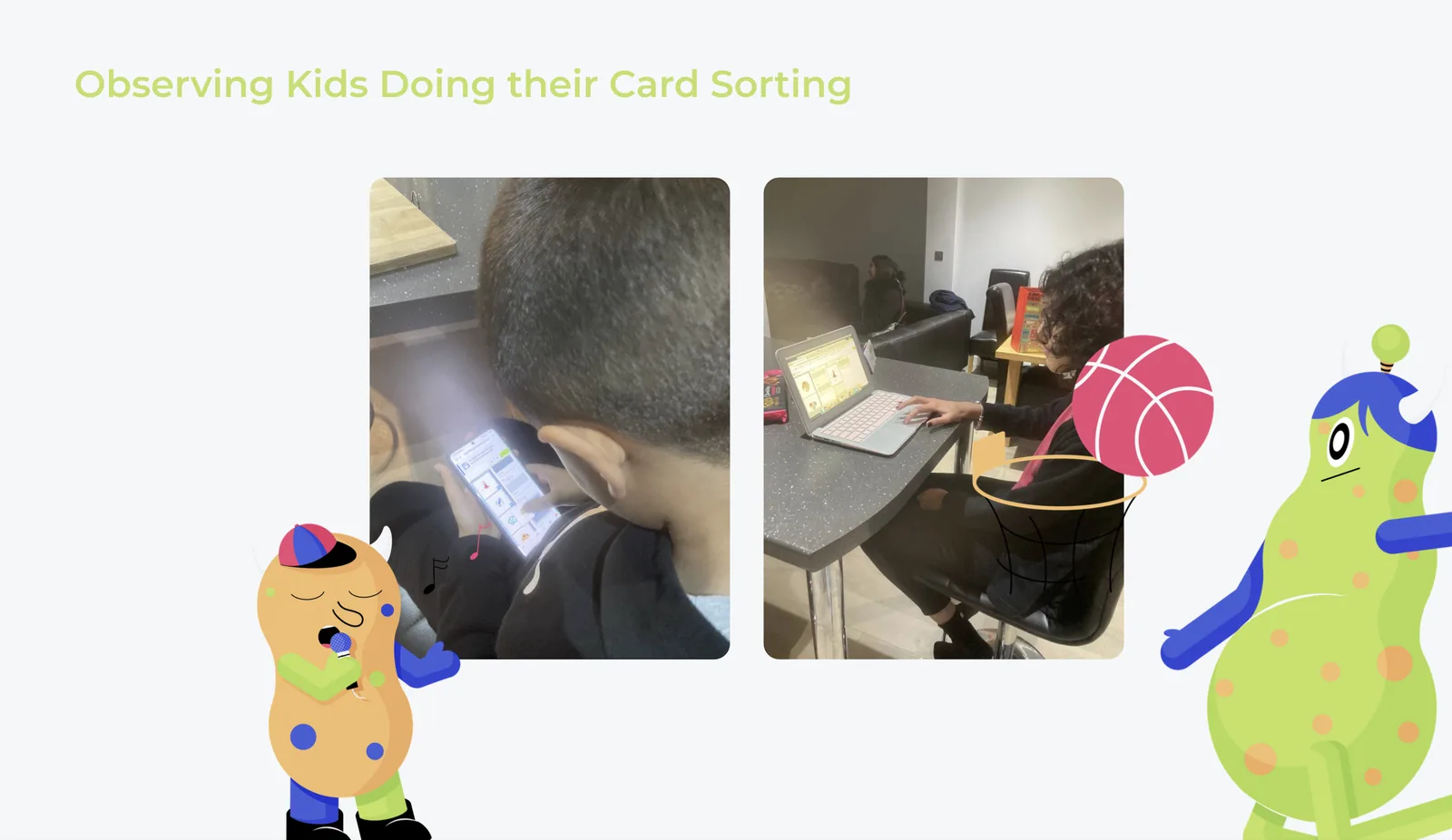
Observing kids doing their card sorting: two children photographed during the card sorting exercise, one on a tablet and one on a laptop

Four complementary testing methods: card sorting and tree testing for architecture, interviews and observation for real-world behavior

Test 1 and 2: Card Sorting

User Test 1 Closed Card Sorting: children were given 8 pictures and category names and asked to organize them into the categories that matched
User Test 2 Open Card Sorting: participants were asked to cluster labels for existing Parent App content into their own categories and label those categories to surface users' mental models

Closed card sort (left) validated existing categories; open card sort (right) surfaced how parents naturally group app content

Card sorting results: the word WonderBudi confused the participants and they categorized it separately from all other items
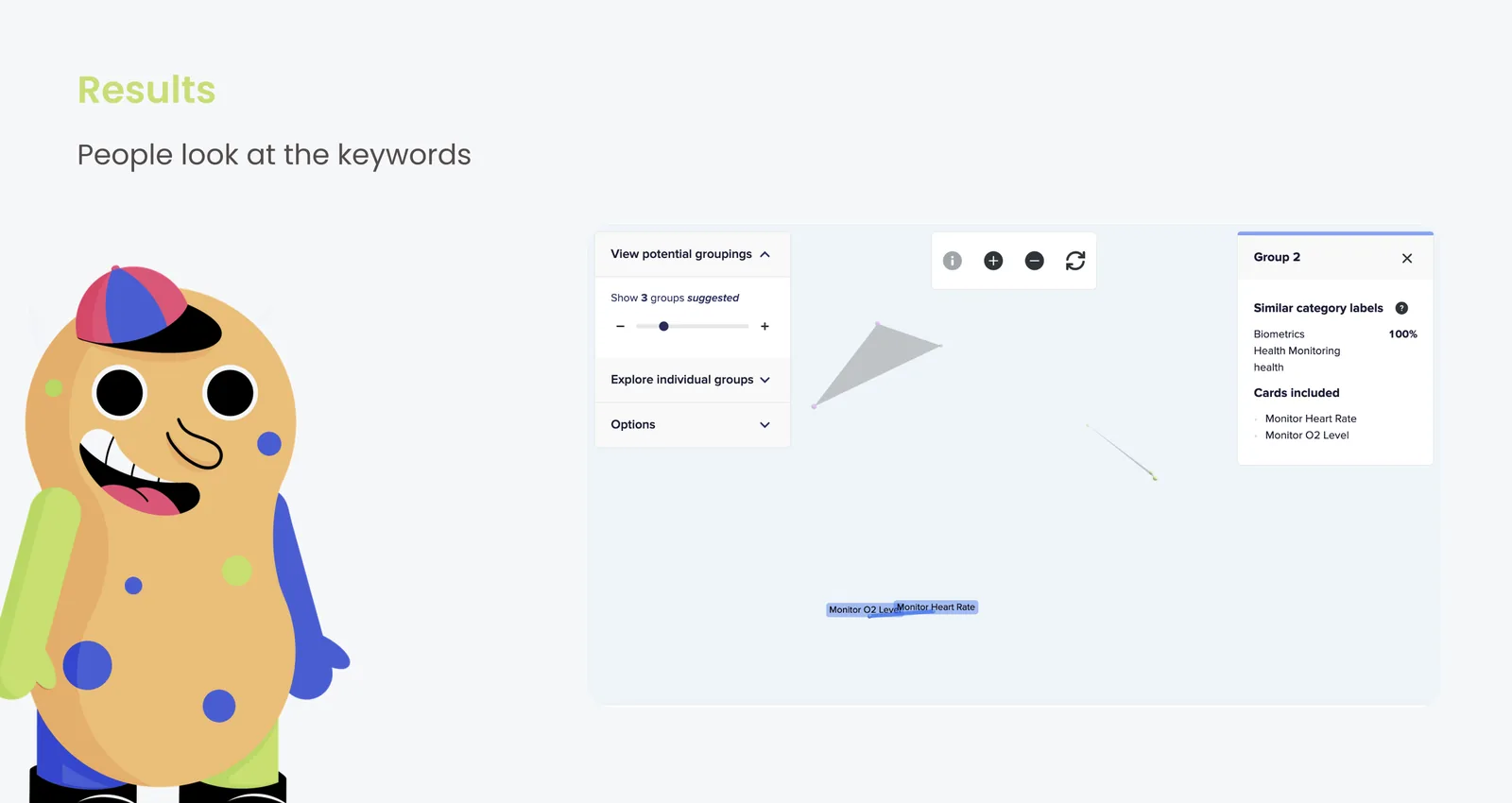
Card sorting results: people look at keywords. Monitor Heart Rate and Monitor O2 Level grouped together under biometrics with 100 percent agreement across participants.

Two key findings: the WonderBudi label caused confusion, and users rely on concrete keywords rather than brand terms to navigate

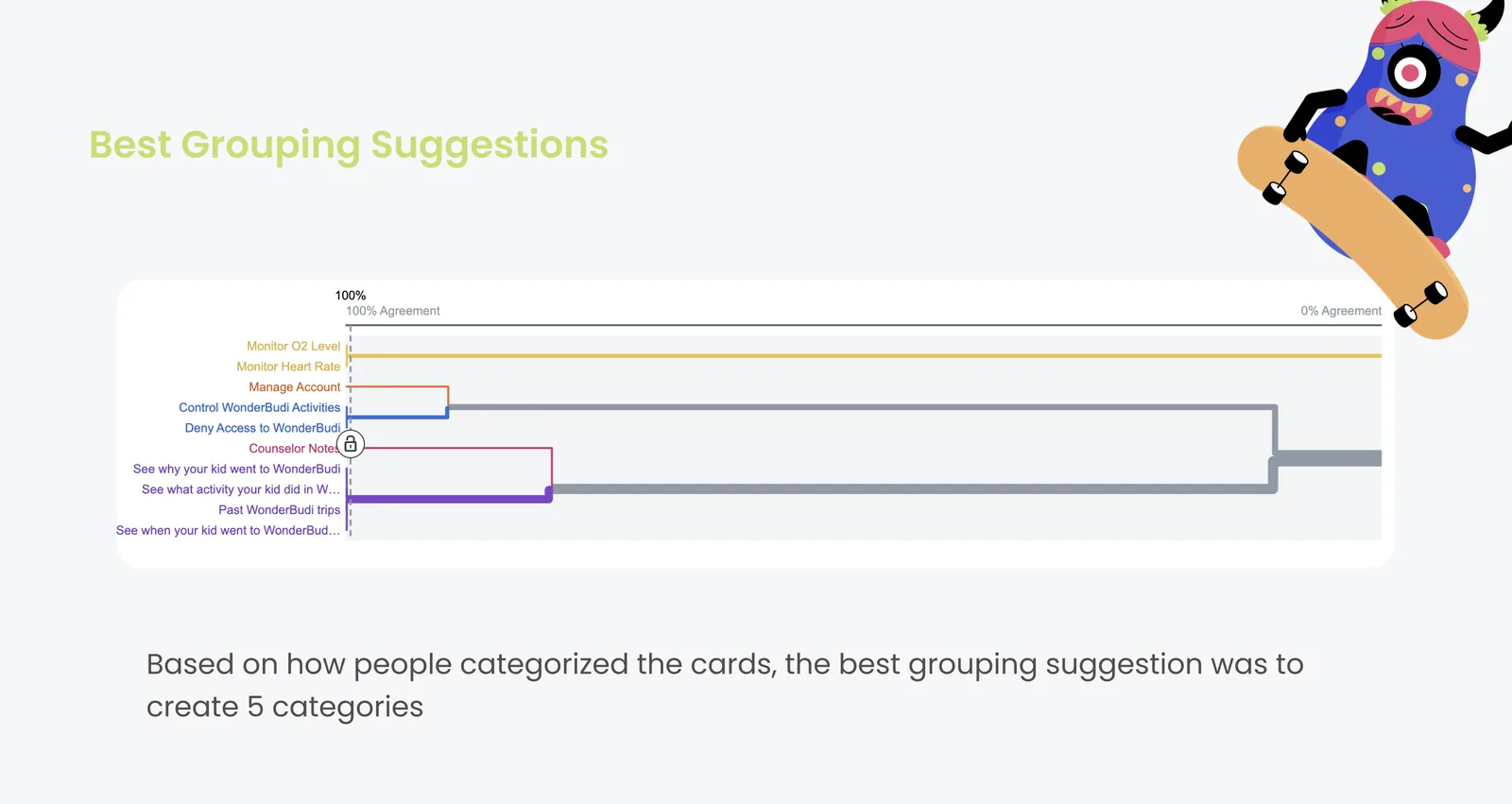
Best Grouping Suggestions: based on how people categorized the cards, the optimal structure uses 5 categories: Monitor O2 Levels, Monitor Heart Rate, Manage Account, Control WonderBudi Activities, and Deny Access to WonderBudi

Card sorting data pointed clearly to a 5-category navigation structure for the Parent App

Test 3: Tree Test

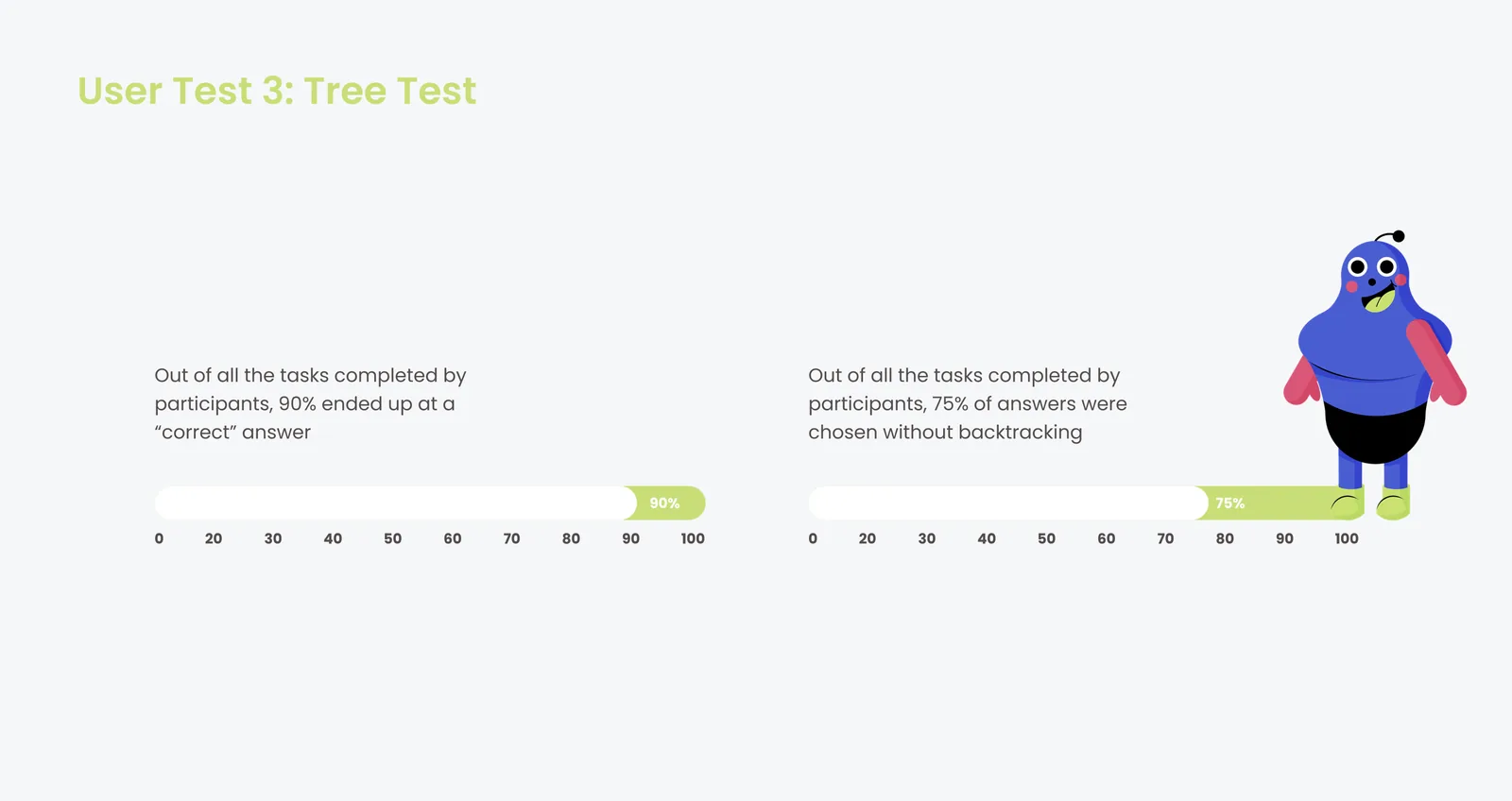
User Test 3 Tree Test results: 90% of tasks completed by participants ended at a correct answer; 75% of answers were chosen without backtracking

Tree test results: 90% task success rate and 75% directness confirmed the 5-category navigation structure was intuitive and ready for production

Navigation Clarity

90% of participants reached the correct destination, confirming the 5-category structure mapped closely to how parents think about monitoring their child.

Direct Pathing

75% of answers were reached without backtracking, a strong signal that the information architecture was intuitive without prior training or guidance.

Label Confusion

The term WonderBudi as a navigation label confused participants and was categorized separately. Labels were revised to reflect specific actions rather than the product name.

Keyword Reliance

Users scanned for concrete keywords rather than brand names. Labels across the app were revised to prioritize action-oriented language throughout.

A system that speaks for those who cannot

WonderBudi demonstrates that a child who cannot yet put their distress into words does not have to stay invisible. The six educators and counselors who participated in testing responded with consistent enthusiasm. One 4th grade teacher described it as the first tool she had seen that could catch the kids who fall through the cracks before they disappear entirely. A school counselor at an international school noted that the emoticon routing system solved the identification problem that consumes the majority of a counselor’s day. By reading biometrics, offering play-based calm, and routing real data to the adults who need it, WonderBudi creates a bridge between a child in need and the professional who can help.

Final Deliverables section
WonderBudi final product shot: the robot closeup with a colorful activity screen showing sports, breakfast, drawing, and other categories, alongside Budiband wristbands in multiple colors

The final WonderBudi product: robot, Budiband wristbands in five colors, and the embedded activity touchscreen

Key Finding

A 90% tree test success rate and 50 out of 52 parents approving wearables for their children validated both the information architecture and the core premise: parents actively want visibility into their child’s school-day wellbeing and will adopt a system that gives it to them.
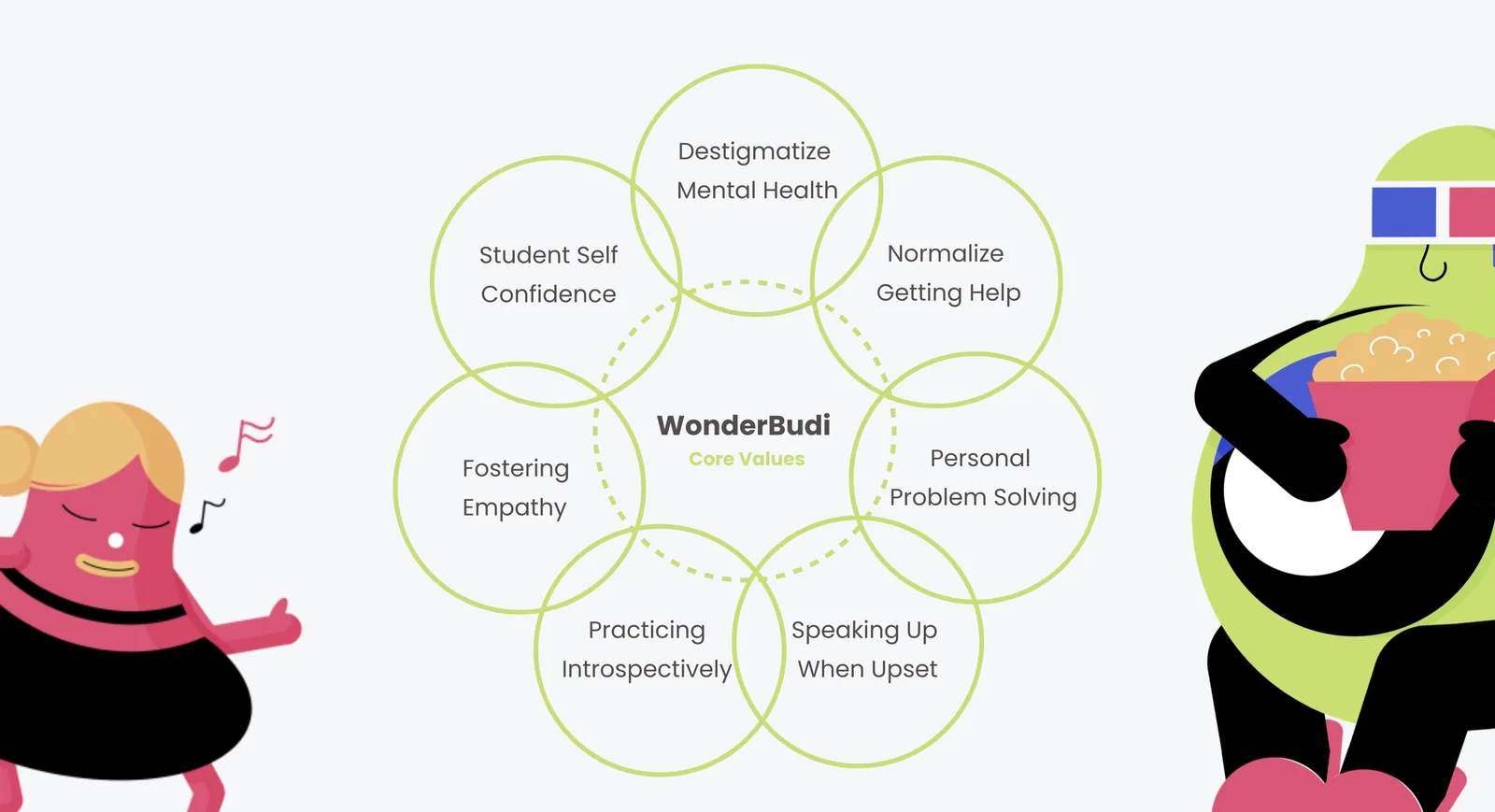
WonderBudi Core Values radial diagram: Destigmatize Mental Health, Normalize Getting Help, Student Self Confidence, Personal Problem Solving, Fostering Empathy, Practicing Introspectively, Speaking Up When Upset

Seven core values guided every design decision, from the script language Budi uses to the color options on the Budiband

Impacts for Social Change: a catalyst for identifying potential underlying problems, facilitates access to professional help, normalizes children expressing themselves in times of stress, fosters a uniform vocabulary for navigating emotional dysregulation

Four social change impacts: WonderBudi serves as an early intervention tool and a normalizer for children’s emotional expression at school

WonderBudi Manufacturing Components List: Antenna with motion capture camera, microphone, and servo motor; Face Screen 10 by 6 inch 1080p OLED; Main Screen 10 by 19 inch 1080p OLED touchscreen; Lights are RGB LED Light Strips; Body is thermal or injection moulded plastic depending on production scale; Internal Structure is aluminum frame

Manufacturing specification for production at scale, with two body material options depending on production volume

Future Directions

Personalization Engine

The longer WonderBudi knows a child, the more precisely it can tailor activities and conversation scripts to what works for that specific child over time.

Counselor Dashboard

A dedicated counselor view to see cross-class distress patterns, flag recurring students, and coordinate follow-up sessions without reviewing individual parent app logs.

Tier 2 Tablet

A lower-cost tablet-only version at $300 would make WonderBudi accessible to schools with tighter budgets and no space for a dedicated robot station.

Longitudinal Study

A multi-semester study tracking emotional regulation outcomes would provide clinical evidence to support adoption across broader school districts and funding bodies.