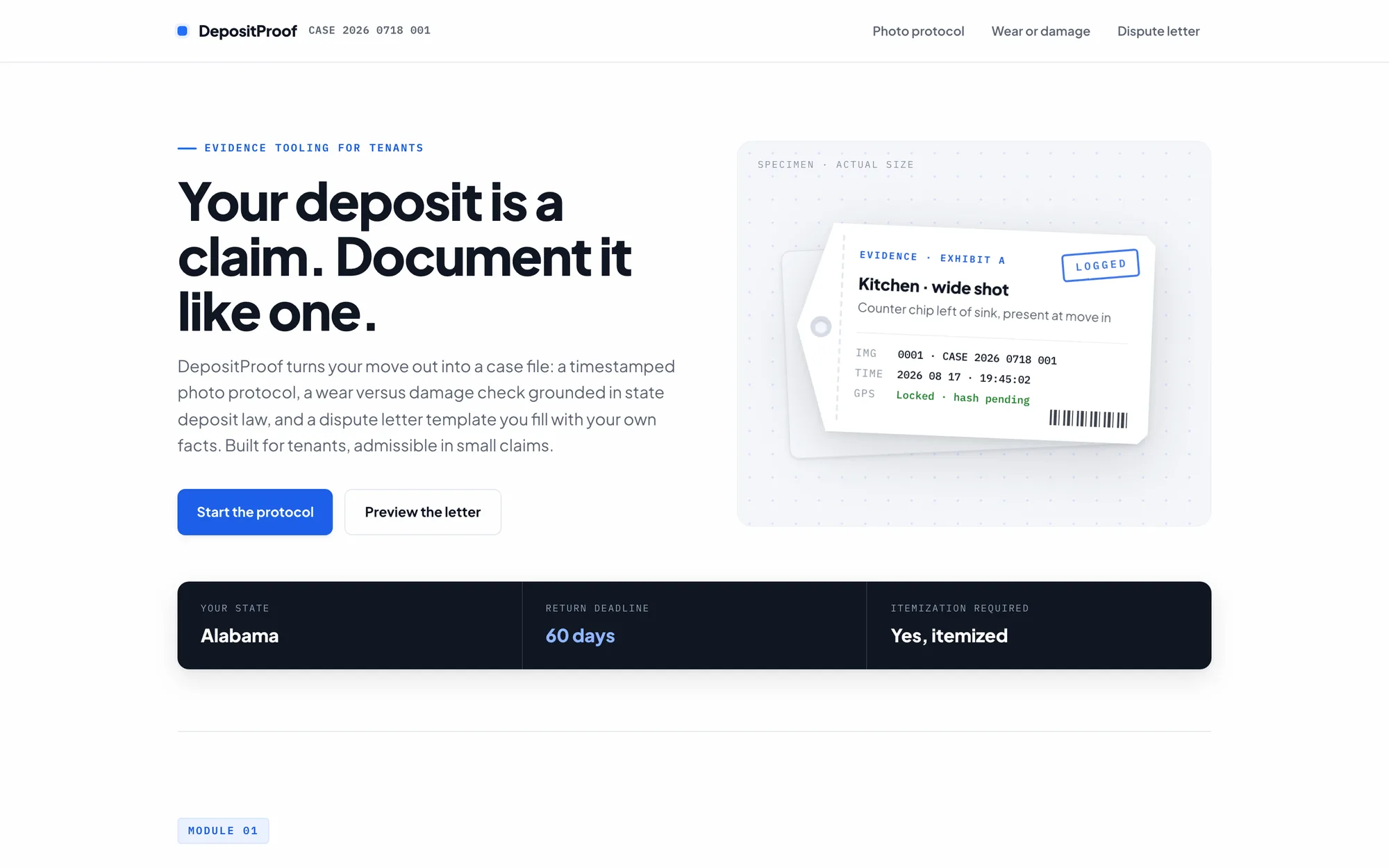
At a Glance
Role: Design Engineer, designed and built solo end to end
Platform: Browser only, single file web app
Outcome: Shipped: evidence packets build and print with nothing leaving the device
Evidence tooling for the worst week of renting
DepositProof is a tool for tenants fighting to get a security deposit back. It gives a move out the structure of a legal filing: every photo is logged with a timestamp, a location tag, and a fingerprint; every deduction the landlord claims can be checked against how courts in that state usually treat it; and the dispute letter assembles itself from the evidence as you go.
The entire product is one HTML file. No framework, no build step, no backend, no account, and no photo ever leaves the browser. That constraint is not minimalism for its own sake. It is the privacy posture of a tool whose input is photographs of the inside of your home, and it shaped every engineering decision that follows, including the biggest one: this tool deliberately does not use AI.
My Role
Design Engineer · Designed and built the entire product solo: research, interface, evidence pipeline, legal content, and test harnesses
Stack
Plain HTML, CSS, and JavaScript · exifr for EXIF parsing · Web Crypto for hashing · Puppeteer harnesses for testing
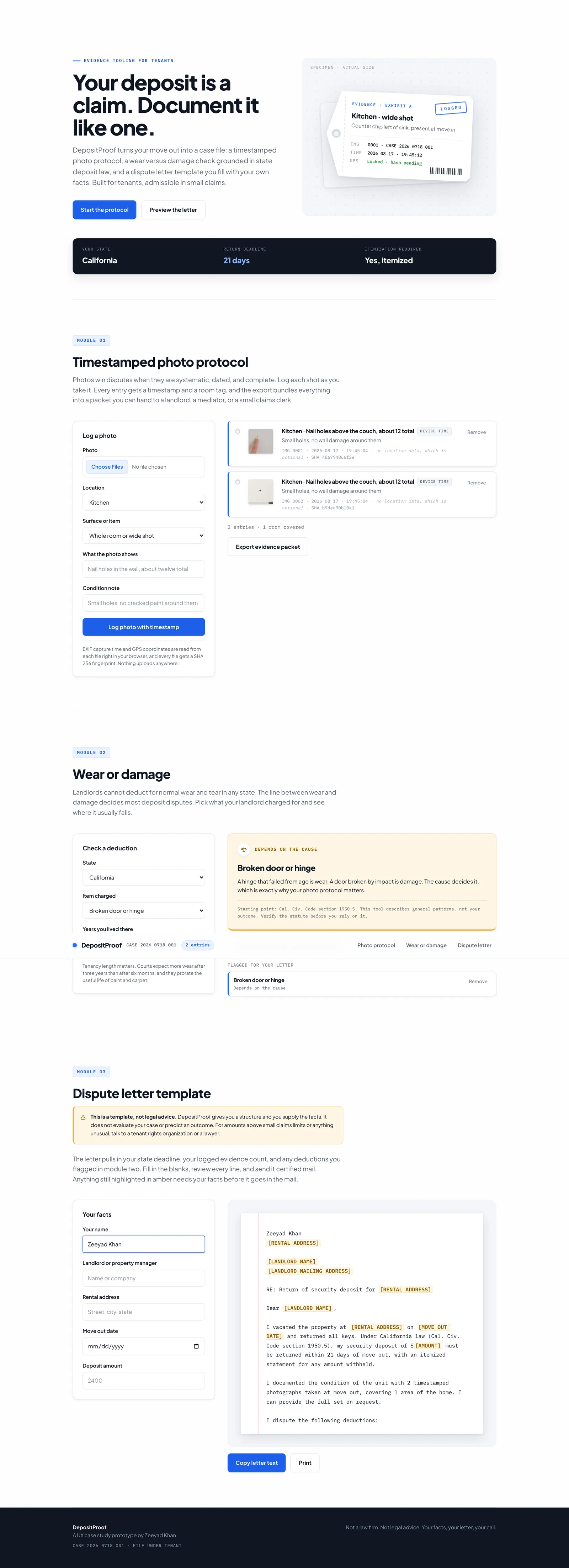
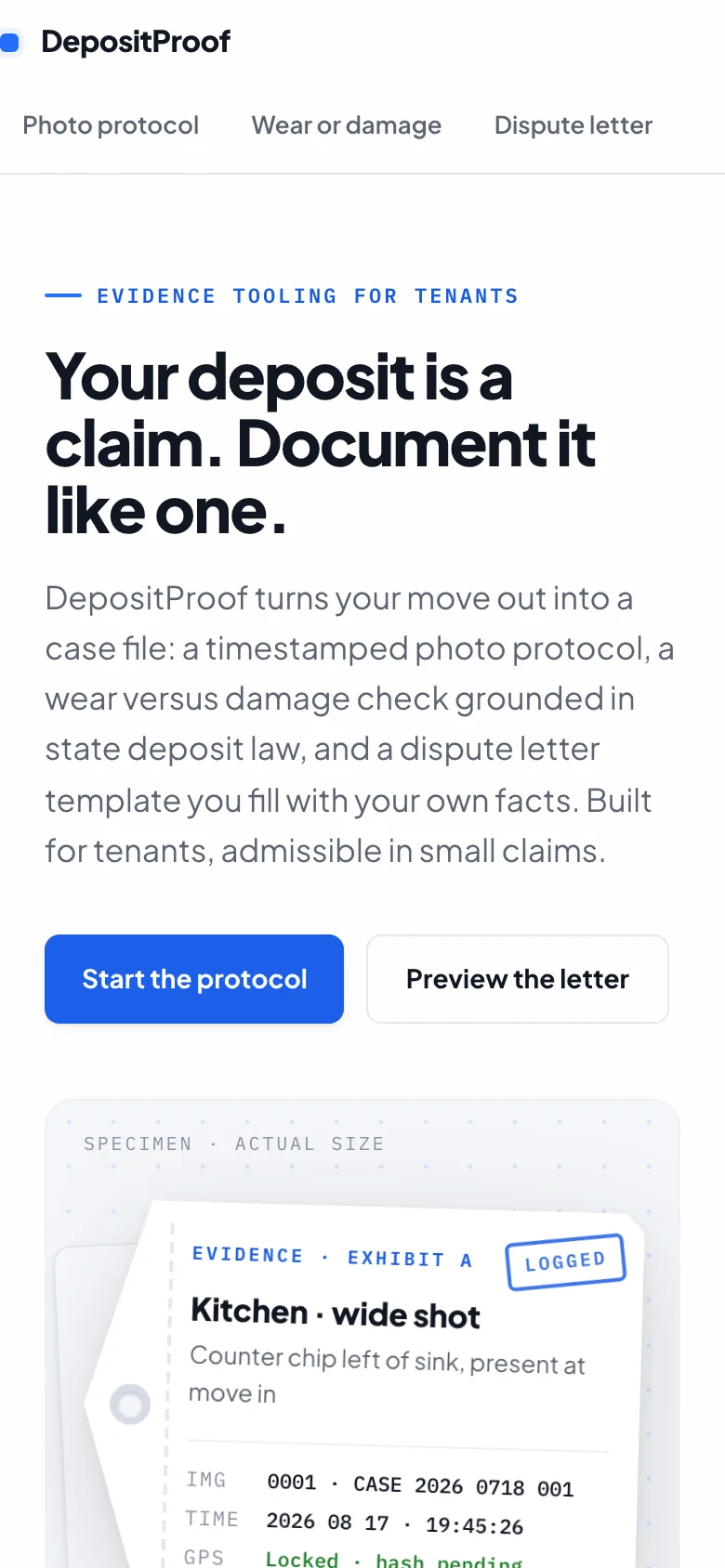
The whole product on one page: protocol, classifier, and letter, connected as a single case file
See it work
A walkthrough of the full flow: logging photos with verified timestamps, checking a deduction against state law, and watching the dispute letter build itself from the evidence.
DepositProof walkthrough: photo protocol, wear versus damage verdicts, and the dispute letter
People search for this exactly once, at maximum stress
Security deposit disputes are one of the most common landlord and tenant conflicts, and the line that decides most of them is blurry by design: what counts as normal wear, and what counts as chargeable damage. Tenants lose winnable disputes because their evidence is scattered, undated, and incomplete.
The product insight is in that first sentence. Nobody browses deposit tools. A tenant finds this once, in the week they are moving out, often the night before a walkthrough, already stressed. That rules out onboarding, accounts, and anything that asks for trust before delivering value. It also raises the stakes on privacy: the input to this tool is photographs of the inside of someone's home, taken during a conflict with the person who owns it.
Give a tenant the evidence discipline of a legal filing in a single sitting, with zero learning curve, without a single photo leaving their device?
Most tools in this space serve the landlord. DepositProof flips to the tenant side deliberately, which is sharper positioning than another inspection app, and it borrows its interface language from the courtroom rather than the camera roll: exhibits, case numbers, evidence tags, and a letter you could hand to a small claims clerk.
Three modules, one case file
The page is organized as three modules that feed each other. Photos logged in module one become the evidence count in the letter. Deductions flagged in module two become dispute paragraphs. Everything the tenant does accumulates into one printable document.
Module 01 · Timestamped photo protocol
Each photo is logged with a location, a subject, and a condition note. The browser reads the EXIF capture time and GPS coordinates from the file itself and computes a SHA 256 fingerprint, all locally. Every entry renders as an evidence tag with a sequential exhibit number and a badge that says exactly how trustworthy its timestamp is.
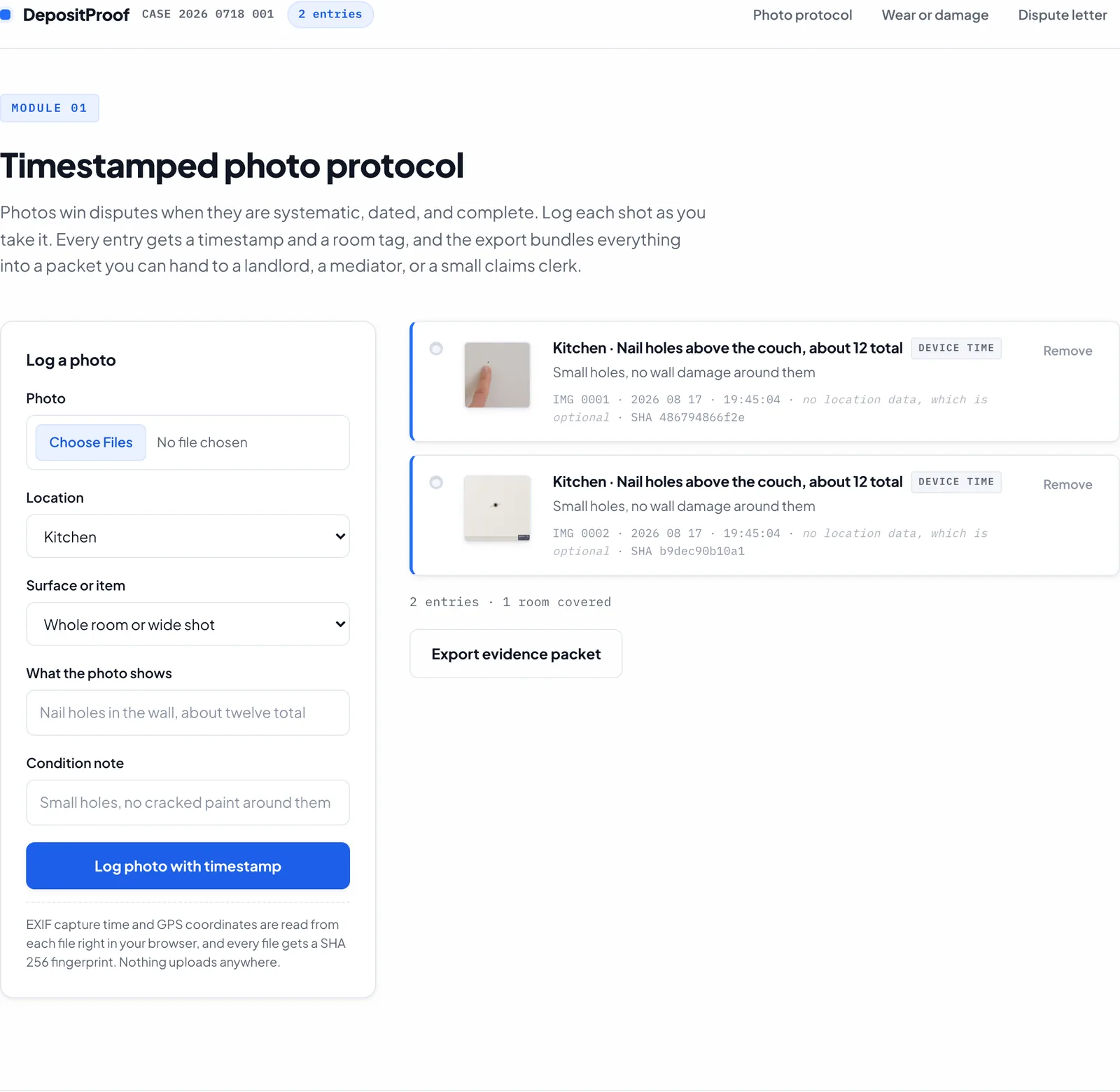
Two logged entries with thumbnails, exhibit numbers, timestamps, and SHA fingerprints, ready to export as a packet
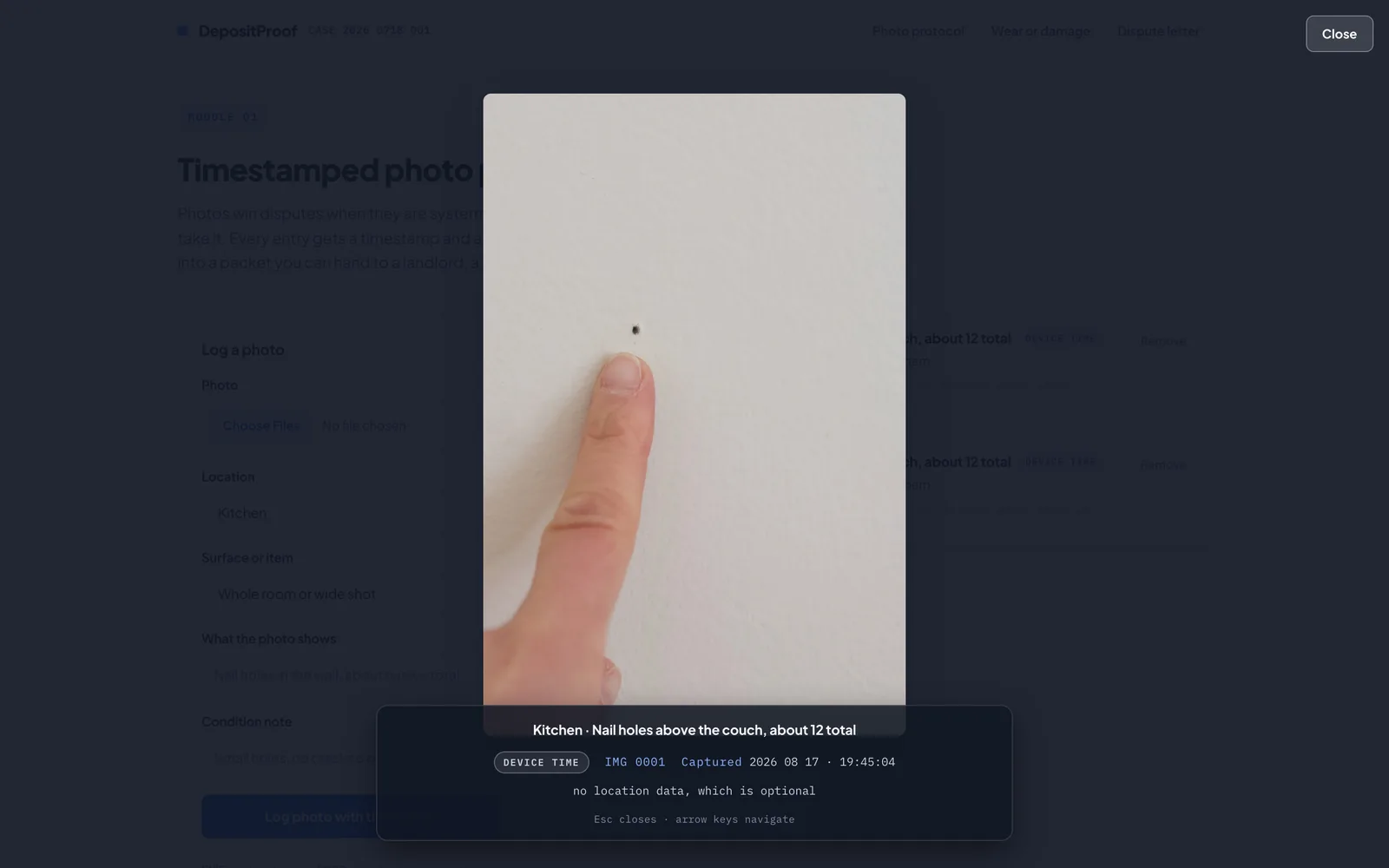
The evidence lightbox: arrow keys move between photos, and focus returns to the exact thumbnail on close
Module 02 · Wear or damage
The tenant picks what the landlord charged for and their state, and gets a verdict card: green for what courts usually treat as normal wear, red for what usually reads as chargeable damage, and amber for the cases that genuinely depend on cause. Every verdict carries the state statute citation and the same warning: this tool describes general patterns, not your outcome.
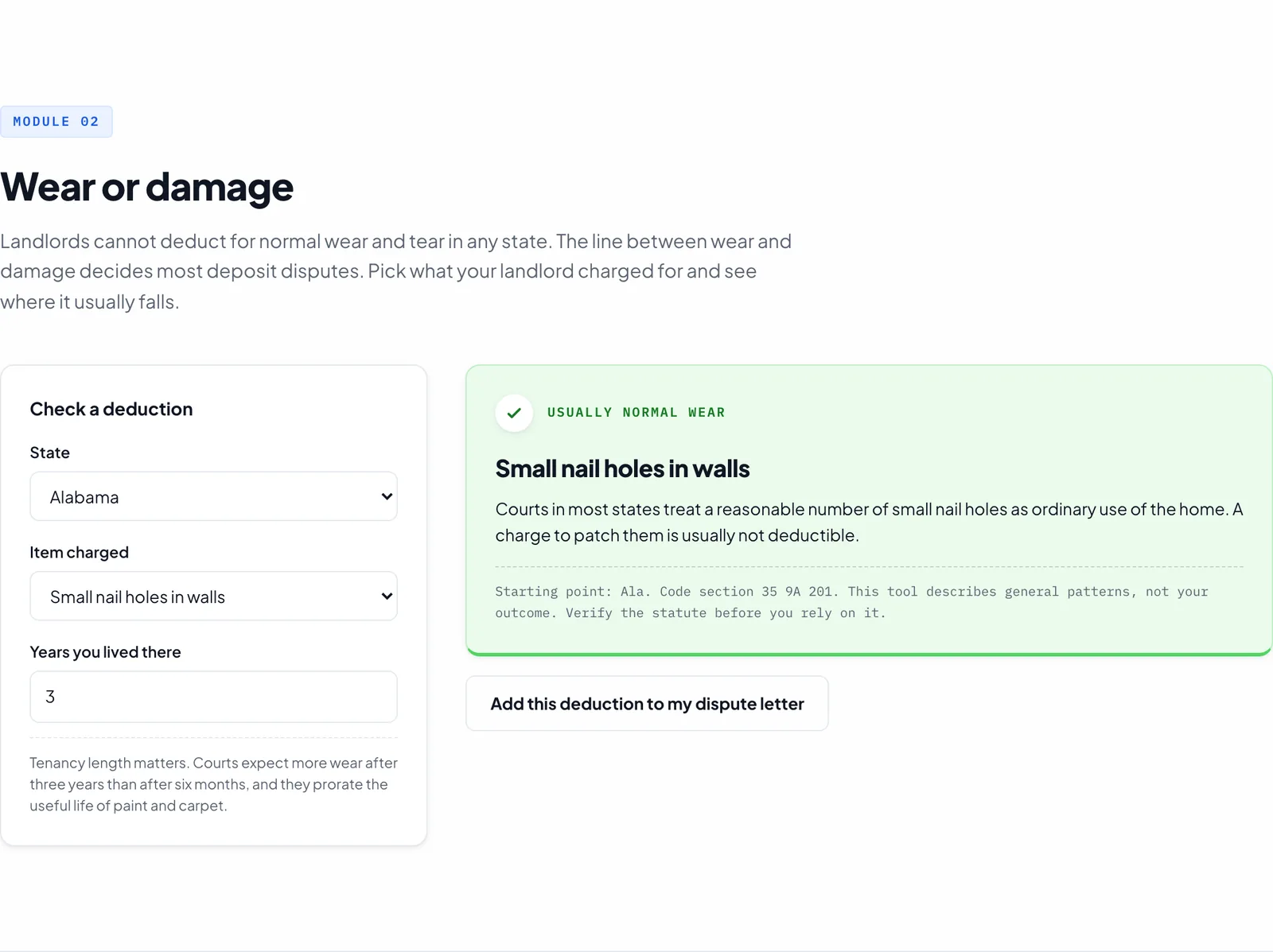
A wear verdict: green, hedged, and anchored to the state statute rather than a promise
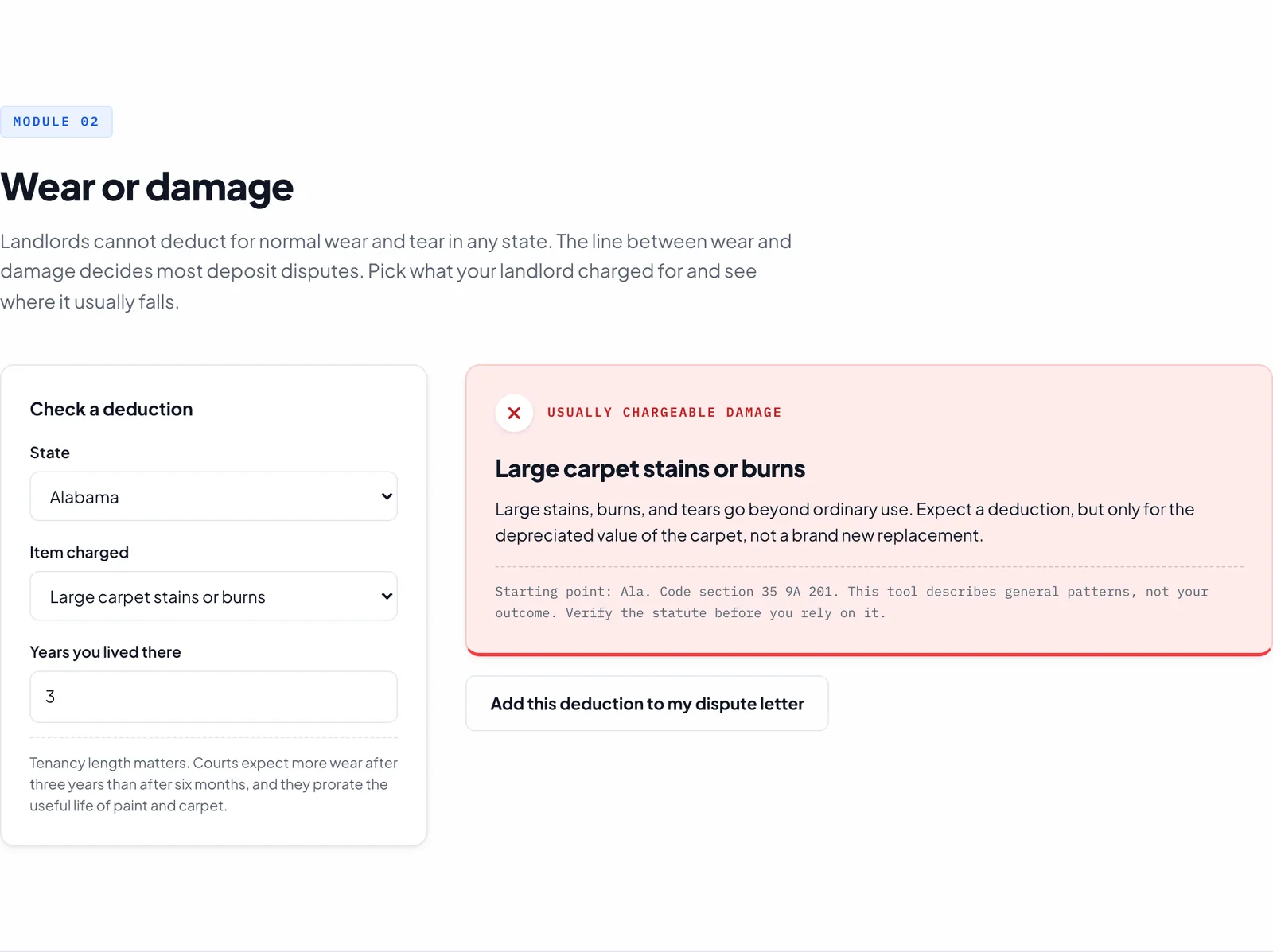
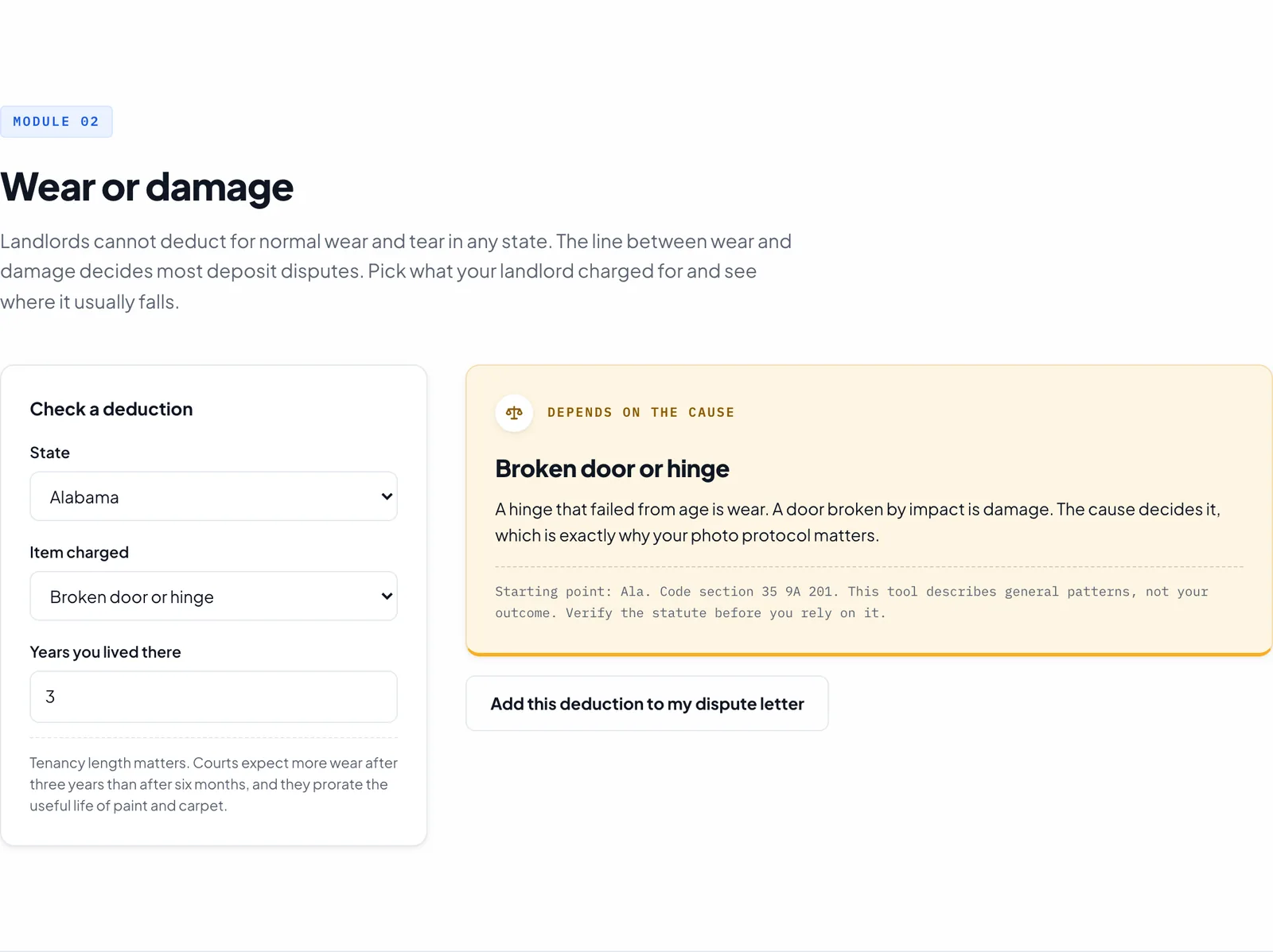
Damage in red, judgment calls in amber. Color is never the only signal: the icon, the border, and the label all change together
Module 03 · Dispute letter
The letter is the payoff. It pulls in the state deadline and statute, counts the logged evidence, and lists every flagged deduction. Anything the tenant has not filled in yet stays visible as an amber placeholder, so the letter is always complete and always honest about what is missing. Copy it, or print it straight to PDF.
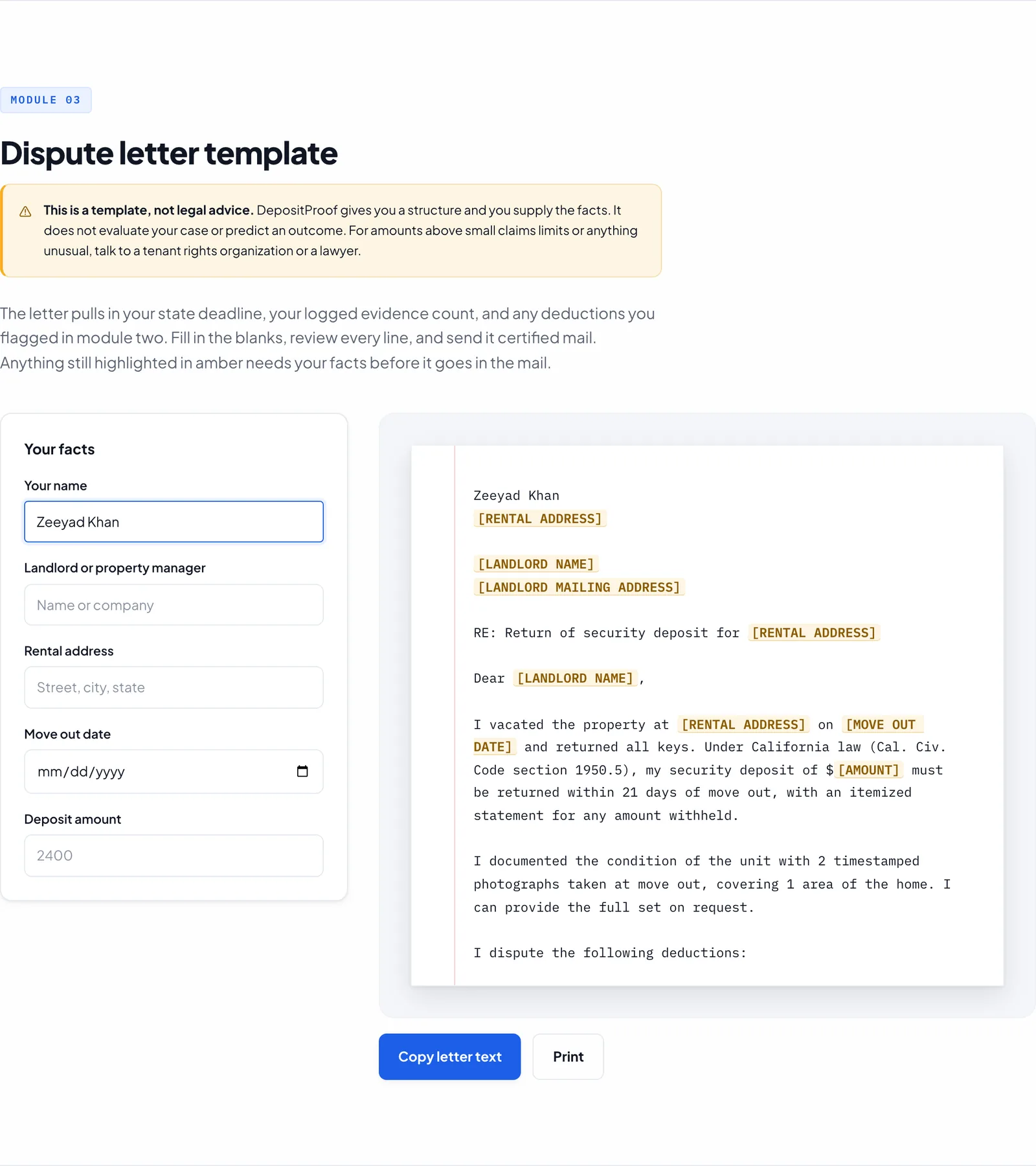
The letter builds itself as facts arrive. Amber highlights mark exactly what still needs the tenant before it goes in the mail
The same file serves phones through four surgical breakpoints, because most move out photos start on a phone
One file, three render functions, one sink
There is no router, no store, no component tree, and no dependency the browser has to download before the page works. The architecture is 970 lines in one file: design tokens, section commented CSS, markup, a data layer of two hand authored tables, and about thirty functions.
State is two arrays: photos and flagged. Each module has a render function, and the call graph has a single deliberate terminal: everything that changes evidence ends by calling buildLetter(). Log a photo and the letter's evidence sentence rewrites itself. Flag a deduction and a dispute paragraph appears. Change your state and the statute citation updates in three places at once. That one call is what makes three modules feel like one case file, with no framework in sight.
file input → logPhoto() → processFile(file)
   ├ file.arrayBuffer() → crypto.subtle.digest('SHA-256')
   ├ FileReader          → base64 thumbnail
   └ exifr.parse(file)   → capture time, GPS
        ↓
  photos.push(entry) → renderPhotos() → buildLetter()

state / item change → classify() → verdict card
   └ addToLetter() → flagged.push() → buildLetter()

every letter field → oninput → buildLetter()
The privacy promise is structural, not aspirational. There is no fetch() anywhere in the file, no analytics, no storage of any kind. Photos live in memory and die on refresh. The export is a fully self contained JSON packet with the images embedded as data URLs, so one file carries the photos, timestamps, coordinates, fingerprints, and flagged deductions together.
No persistence is a tradeoff, not a free win. A tenant who refreshes mid session loses their log, and the tool does not warn them. I chose the privacy posture anyway: for this audience, a tool that cannot leak is worth more than a tool that cannot forget, and the export packet is the intended save mechanism.
Restraint as an engineering discipline
DepositProof is defined less by what it uses than by what it refuses: no AI where a wrong answer could cost someone real money, no invented precision in the legal content, no fake completeness in the letter. Each refusal took more engineering than the obvious alternative.
1 · The decision not to use an LLM
The obvious build in 2026 is a chat box: describe the deduction, let a model tell you if it is wear or damage. I built the opposite. Classification runs on a nine row, hand authored rules table whose language is deliberately hedged, and the project rules make that a hard constraint: the tool never evaluates case strength, never predicts outcomes, and keeps every claim at the level of what courts usually do.
const RULES = {
  nailholes:{v:'wear', label:'Usually normal wear',
    body:'Courts in most states treat a reasonable number of small nail holes as ordinary use of the home. A charge to patch them is usually not deductible.'},
  brokendoor:{v:'judgment', label:'Depends on the cause',
    body:'A hinge that failed from age is wear. A door broken by impact is damage. The cause decides it, which is exactly why your photo protocol matters.'},
  ...
};
The proof that this is a code path and not just a copy style is the escape hatch. When a tenant types a charge that is not in the table, the tool explicitly declines to guess:
if(key === '__other__'){
  document.getElementById('vLabel').textContent = 'Depends on your facts';
  document.getElementById('vBody').textContent =
    'This item is not in the built in list, so DepositProof does not ' +
    'suggest whether it usually reads as wear or damage. Describe exactly ' +
    'what happened, then let your photo evidence and your state statute ' +
    'carry the argument.';
A language model would have answered that question confidently. For a user at maximum stress making a financial decision, a confident wrong answer is the worst possible output. Nine defensible rows beat infinite undependable ones, and every verdict is stamped with the same footer: a statute citation plus the words this tool describes general patterns, not your outcome.
2 · The tool ranks its own evidence
Not all timestamps are equal, and an evidence tool should say so. When a photo carries EXIF metadata, the camera's capture time beats the browser clock and the entry earns a blue EXIF verified badge. When it does not, the entry gets a grey device time badge instead. The interface visibly grades the quality of its own evidence rather than flattening everything into one look.
The EXIF parser itself is loaded with a pattern that packs four decisions into five lines: lazy, so fifty kilobytes of parsing code never blocks first paint; memoized on the promise, so concurrent uploads share one load; normalized across module formats; and failure tolerant, so a missing parser degrades to device time instead of breaking the log button.
let exifrModule = null;
function getExifr(){
  exifrModule = exifrModule || import('./node_modules/exifr/dist/full.esm.mjs')
    .then(m => m.default || m)
    .catch(() => null);   // EXIF is optional: a failed load degrades to device time
  return exifrModule;
}
3 · The hash is an affordance, and I know it is not a chain of custody
Every file gets a SHA 256 digest from the Web Crypto API, displayed as a twelve character prefix so the evidence tag stays readable. Here is the honest part: the export stores only that prefix, which means the packet cannot yet be used to verify a file's full digest. And on a file origin the crypto API is unavailable entirely, so the tag falls back to hash pending. Today the fingerprint tells a tenant the tool takes integrity seriously. Making it a real chain of custody is a two line change, store the full digest and display the first twelve characters, and it is first on the list for the full build.
async function hashFile(buf){
  try{
    const digest = await crypto.subtle.digest('SHA-256', buf);
    return Array.from(new Uint8Array(digest))
      .map(b => b.toString(16).padStart(2,'0')).join('').slice(0,12);
  }catch(e){ return ''; }   // no secure context, no hash: tag shows "hash pending"
}
4 · The obvious optimization is a correctness bug
Uploaded files are processed one at a time with a sequential await, and that is load bearing. Each entry's exhibit number is derived from the length of the photos array at push time. Parallelize the loop with Promise.all, the obvious performance move, and every photo in a batch computes its number before any of them push: an entire batch of exhibits named IMG 0001. In an evidence tool, the slow loop is the correct loop.
for(const f of files){
  const entry = await processFile(f, location, surface, subject, cond);
  photos.push(entry);   // id depends on photos.length, so order matters
}
5 · The letter is never blank
There is no letter not ready state and no locked form. The letter renders complete from the first second, with every missing fact shown as an amber placeholder like [LANDLORD NAME]. The mechanism is one regex that doubles as a contract: any bracketed uppercase token in the letter is, by definition, a fact the tenant has not supplied yet. The user copy explains the rest: anything still highlighted in amber needs your facts before it goes in the mail.
document.getElementById('letterBody').innerHTML =
  escapeHtml(raw).replace(/\[[A-Z][A-Z0-9 ]*\]/g,
    m => '<mark class="ph">' + m + '</mark>');
The ordering matters: user text is escaped before the markup is injected, so a tenant can type anything into the form without touching the DOM. And the placeholder shape is reused as a design tool elsewhere. When someone flags an unnamed Other deduction, it enters the letter as [DESCRIBE THE ITEM], deliberately shaped to match the regex so it arrives already highlighted. A document with visible holes is more useful than a locked form, especially for someone doing this once, in a hurry, at two in the morning.
6 · The PDF export is twelve lines of CSS
No PDF library, no canvas rendering, no server. Printing the letter is a print stylesheet that hides the entire application except the letter itself, strips the amber highlights to plain black text so unfilled slots print as ordinary brackets, removes the decorative margin rule, and unsets the preview's scroll constraints so the letter paginates properly. The browser's own print to PDF does the rest.
@media print{
  header,footer,.hero,#protocol,#classify,.toast,.lightbox,
  #letter .step,#letter h2,#letter .lede,#letter .disclaimer,
  #letter .panel,#letter .letteractions{display:none !important}
  .letter{border:none;box-shadow:none;padding:0;max-height:none;
    overflow:visible;color:#000;font-size:11pt;line-height:1.7}
  .ph{background:none;color:#000;font-weight:400}
  @page{margin:2cm}
}
One judgment call hides in that hide list: the disclaimer prints nowhere, even though the project rules say every disclaimer stays visible. I decided that is correct. The disclaimer protects the tenant while they build the letter. The printed artifact is addressed to the landlord, and a letter that arrives stamped this is not legal advice argues against itself.
The smaller calls that add up
The one prose comment in the app documents a decision not to build something: focus moves to the close control on open and is restored on close, and Tab is left to the browser so focus is never trapped on a single control. A dialog with exactly one focusable element does not need trap machinery. The close handler even checks that the original thumbnail still exists before returning focus to it, because a re render may have removed it while the lightbox was open.
The evidence tag specimen in the hero carries a live timestamp that updates every second. The CSS kill switch for reduced motion cannot stop a JavaScript timer, so the code checks the same preference and throttles the interval from one second to sixty. Respecting a motion preference in two languages, because one of them cannot see the other's animations.
An early build rendered 1 rooms covered, preserved in an old screenshot. In a tool that impersonates a legal document, grammar is correctness, so the fix was structural rather than a ternary at one call site: a pluralize helper threaded through five surfaces, from the header chip to the letter's evidence sentence, so the mistake became impossible everywhere at once.
Switching between two wear items changes text inside an already green card, which users miss. The code forces a synchronous reflow between removing and re adding the animation class, restarting the fade so every verdict change is visible motion. A small detail that requires knowing how the browser batches style changes.
To test EXIF, write an EXIF encoder
A single file app with no framework still deserves real verification. Two Puppeteer harnesses drive the actual app in a real browser: one exercises the full evidence pipeline, the other captures screenshots while asserting on cross module behavior. The most interesting engineering in the repo lives here.
The upload harness needed a photo with trustworthy EXIF metadata and a photo without it, in the same batch, to prove that mixed provenance evidence renders correctly. Rather than mock the parser, the harness builds a valid EXIF segment byte by byte, TIFF header, IFD pointers, capture time, GPS rationals, and splices it into a generated JPEG right after the start of image marker:
// Build an EXIF APP1 segment: DateTimeOriginal 2026:07:01 14:30:22,
// GPS 33 44 56.40 N, 84 23 16.80 W (little endian TIFF)
tiff.write('II', 0, 'ascii');        // little endian marker
tiff.writeUInt16LE(0x2A, 2);         // TIFF magic 42
entry(10, 0x8769, 4, 1, 0x26);       // pointer to the Exif IFD
entry(22, 0x8825, 4, 1, 0x38);       // pointer to the GPS IFD
tiff.write('2026:07:01 14:30:22\0', 110, 'ascii');
...
const jpgExif = Buffer.concat([jpgPlain.slice(0, 2), buildApp1(), jpgPlain.slice(2)]);
From there the harness gets serious about what it checks. It opens the lightbox and walks it with arrow keys, asserting not just visibility but focus behavior: that focus lands on the close control on open, and that it returns to the exact thumbnail on close. It enables browser downloads through the DevTools protocol so it can capture the exported evidence packet off disk, parse it, and verify the EXIF flag, the GPS string, and the hash survived the round trip. And it pulls the generated sentence out of the letter with a regex to prove the cross module wiring: logging photos in module one really did rewrite module three.
letterHasName: ...includes('Zeeyad Khan'),
letterHasFlag: ...includes('Broken door or hinge'),
letterHasCA:   ...includes('California'),   // module 2 state rewrites module 3 statute
phCount: document.querySelectorAll('#letterBody .ph').length,
overflowX: document.documentElement.scrollWidth > document.documentElement.clientWidth
The screenshot harness reloads the page at phone size and measures horizontal overflow in pixels, a numeric responsive regression check with no framework. Both harnesses install error listeners before doing anything else, which pairs deliberately with the app's decision to swallow EXIF loader failures: the app is designed to degrade silently, so the harness is designed to catch what the app hides. Even the demo photo is engineered: a fixture script paints a photoreal wall in canvas, complete with texture noise and a nail hole shadow, then splices in the same forged EXIF, because the demo needed evidence that looks real without shipping a photo of anyone's actual apartment.
Nothing is mocked. The harness uploads real files into the real file input, and the EXIF fixture is a byte level forgery that any parser would accept as genuine.
The lightbox assertions check focus restoration, keyboard navigation, and escape behavior, treating accessibility as functionality rather than decoration.
The harness downloads the actual evidence packet and parses it, verifying the packet a tenant would hand to a clerk rather than the state that produced it.
The harnesses print state for a human to read rather than failing a build, and there is no CI. For a single file prototype I judged observation harnesses the right cost. The pure functions are the obvious next candidates for real unit tests.
A shipped tool, and three bugs I will name myself
DepositProof shipped as a complete working product: a three module case file with EXIF verification, local hashing, a fifty state statute table, a self assembling dispute letter, print to PDF export, and two browser harnesses proving the pipeline end to end. It runs from a single file on any static host, or from a double click.
In a product that touches legal outcomes, restraint is a feature users can feel. Hedged verdicts, visible placeholders, refusing to classify unknown items, and grading the tool's own evidence quality all say the same thing: this tool will not pretend to know more than it does. That is what makes the parts it does claim believable.
What I Would Fix First
The strongest engineering habit I took from this build is auditing my own shipped work, so here are the three real defects I found, ranked by product consequence. First, exhibit numbers can collide: remove an entry and the next photo logged can reuse an existing number, which is fatal in a tool whose pitch is an indexed evidence packet, and renumbering is also wrong because a printed tag already carries its number. Second, the tenancy length field is decorative: it re runs the classifier and re fires the animation, but nothing reads its value, while the copy promises that tenancy length matters. Third, there is no loading state while a large batch hashes, so ten phone photos mean seconds of a silent, clickable button. None of these are cosmetic, and all three are on the list for the full build.
What I Learned
Building DepositProof taught me that the hardest engineering decisions in a consumer legal tool are refusals. Refusing an LLM meant hand authoring rules I could defend line by line. Refusing persistence meant the privacy claim is structural rather than a policy promise. Refusing a PDF library meant the export is twelve lines of CSS that will still work in ten years. Every refusal was more work than the default, and every one made the product more trustworthy.
One file with no framework forced every feature to justify its weight, and made the whole product auditable by anyone who can read a page source.
EXIF verified versus device time badges taught me that interfaces can and should communicate how much to trust their own data, not just display it.
In a tool that imitates a legal document, 1 rooms covered is a bug, not a typo. Copy discipline and code discipline turned out to be the same discipline.
The most valuable outcome section I can write is the one that names my own bugs, ranked by consequence. Finding them required the same rigor as building the features.